Thursday, March 8, 2018

Messaging with AI Driven Chatbots

Chatbots are a class of intelligent, conversational software agents activated by natural language input.
A chatbot is a service that you interact with via a chat interface. Texting on a console or speaking directly ala "Alexa" or "Siri" are common examples. The chatbot service can serve any number of functions (informational, practical, or even fun) and it can live in any major chat product. The chatbot itself is powered by rules and sometimes artificial intelligence.

An intelligent chatbot is one that learns conversations all the time to improve its performance.
The modules in a chatbot including user modeling modules and the natural language understanding module which can perform better by learning continuously.

Machine learning (ML) algorithms and human supervisors enable the learning of the chatbot. ML techniques like reinforcement learning supervised, and unsupervised techniques can be leveraged to ensure the AI chatbot becomes a good learner.

The ability to learn is a key factor in creating an intelligent chatbot. With neural networks and deep learning, chatbots can become good learners. Learning is paramount to ensure that the chatbot recognizes patterns in data it receives and responds to user requests in the most appropriate way.

How do we determine if a chatbot is intelligent?

Chatbots adhere to a three-step process for realizing their goal. This sense-think-act cycle defines the intelligence of a chatbot. An AI chatbot goes through this cycle to make progress towards pre-defined goals autonomously.

Sense-think-act intelligent chatbot

For an AI chatbot, sensing the environment where it resides becomes a prerequisite for getting the information required to perform a task. The chatbot finds it easy to listen to what the user says than make sense what is being conveyed by the user. 

Examples of Chatbots

Here are a couple of examples:
  • Weather bot: Get the weather whenever you ask.
  • Grocery bot: Help me pick out and order groceries for the week.
  • News bot: Ask it to tell you when ever something interesting happens.
  • Life advice bot: I’ll tell it my problems and it helps me think of solutions.
  • Personal finance bot: It helps me manage my money better.
  • Scheduling bot: Get me a meeting with someone on the Messenger team at Facebook.
  • A bot that’s your friend: In China there is a bot called Xiaoice, built by Microsoft, that over 20 million people talk to.

Chatbots possibilities in Healthcare


  • Virtual assistance for Care Teams
  • What is my patient caseload toady?
  • Did any patients cancel appointments today?
  • Who is the cardiologist on call tonight?
  • Did my paycheck arrive yet?
  • Pull the lab results for Mr. Smith Jones.
  • Schedule a follow up appointment with Dr. Dre.
  • What is my outstanding balance?
  • Explain this claim i just received.
  • What is the status of my claim?
  • Is the doctor's office open on Fridays?
  • Can my heart medication be taken with aspirin?

Chatbot Architecture

There are two types of chatbots, one functions based on a set of rules, and the other more advanced version uses machine learning.

Rules-Based Chatbot:

This bot is very very limited. It can only respond to very specific commands. If you say the wrong thing, it doesn’t know what you mean. This bot is only as smart as it is programmed to be.

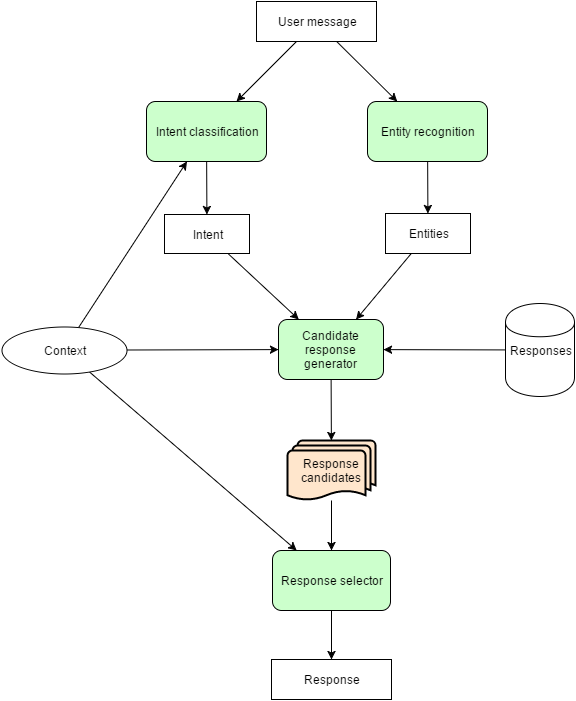
Chatbot conversation framework

Machine Learning Chatbot:

This bot utilizes massive amounts of collected data and intelligent processing to provide responses. You don’t have to be as specific as you might with a rules-based chatbot; it understands natural language, as well as commands. This bot continuously gets smarter as it learns from conversations it has with people.


Platforms

Links


Tuesday, November 25, 2014

New Job, First Day Butterflies

Image Source: http://lentzy.deviantart.com/art/Butterflies-in-my-stomach-53534780

Today was my first day on my new job.  And can I tell you something? There are butterflies in my stomach. I've had them flitting around there all last week, and they are still there today. They are the same butterflies I felt "as a kid", before every swim practice or meet, before a piano recital, or even today, before talking in front of a large audience.

A wise mentor, Amber Rae, once wrote, "Go where there is fear. Growth and freedom lie on the other side."

New job. New team. New tools and processes. New experience.  There is a little fear there, but yes, excitement, too.  And I can see the freedom, and growth beyond. 

Today, I spent time trying to figure out just exactly what my new job is. It's complicated by the fact that I'm the only remote member of my team. I work at a remote office. All the other team members are at corporate headquarters, 340 miles away.  (In the same situation? Here's some recommended reading: Scott Hanselman's Ways to Make Remote Working Work).

It's further complicated by the fact that there really isn't a formal orientation or "onboarding" process (I'm fixing that, by the way, building one as I go -- so I can hand it off to the next "new hire" who comes after me).  My new boss told me, "Drink from the fire hose.  Just listen and learn as much as possible the first 30 days. There's plenty of time to make an impact later. For now, get a lay of the land, work to understand how things get done. Get access to various systems. Get a sense of which meetings are important to be in, which ones are optional or should be skipped entirely. Call me when you need me."

 A colleague outside my department, who works at the same location, just hired some one new.  She commiserated with me, and admitted there is no real orientation process in her department either.  "The best thing to do is to make a list of names and just meet with people individually, to learn what they do and get their backgrounds."

So that's what I've lined up for my next next CHQ visit:  a series of 1:1 interviews with various members of the team, as well as the groups we support.  

While I plan to keep the "flow" informal, I have a list of questions that I hope to weave into the interview. I built the list after reading +Dan Forbes' "33 Questions for Analyzing Your Business" Blog post

1.) What is your role/job description? What do you do?  What did you do before joining this team?  What excites you?  What do you like about this job?
2.) From your view, what is my role? How will we interact day-to-day?
3.) What is our mission? Who are our "customers"? How well do they think we do our job? Do we have a system to measure our customer's satisfaction?
4.) How is our performance / productivity measured (as a team? Individually)? What does success look like? 
5.) What systems or tools do you use?  Do I need them?  How do I request access to them?
6.) How is our business changing?  What was this team / mission / process like 2-3 years ago vs. today?  How do you think it will look 1-2 years out?
7.) What are you working on right now?  What does your project board or product / service roadmap look like (for the systems you touch) in 3-months, 6-months, 1-year, 2-years?
8.) What are you worried or anxious about? What keeps you awake at night?  What help do you need to fix it?

What would you add to that list?

PS - I shared this same post over in the Google+ Leadership: Lead With Giants community. It's one of my favorite communities on Google+ (540 members, all leadership-minded, readily sharing their wisdom and advice).  They are an excellent support group, and provided some very good feedback on this topic. If you have a Google+ account and would like to be part of this community, check out the link above!

Saturday, December 3, 2011

Configure - Price - Quote (CPQ) Solutions


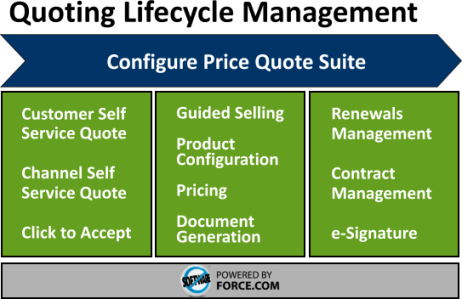
Image: Apttus CPQ Suite


The Sales Cloud application by Salesforce.com provides all of the basic elements for small and medium-sized businesses to generate price books and build sales quotes.  But what about enterprise-sized organizations or even smaller companies with very complex product configurations?  For these businesses, the standard price book, product and quote tools in Salesforce.com may not be sufficient.  These companies must generally turn to a Configure-Price-Quote (CPQ) solution.

What’s In a CPQ Tool?
CPQ solutions vary by vendor, but generally include the following features:

Product Catalog:  In a CPQ tool, Products and/or service offerings are loaded into a product catalog, which stores product information in a structured and consistent way: product name or service name, description, SKU, pricing information and pricing history.  Some CPQ solutions also allow product managers to upload data sheets, pictures and or video clips.  Product catalogs can become very complex tools, allowing organizations to define a nested catalog hierarchy, relationships between products, product code translations for backend billing systems, access / visibility rights, and more.  As a Salesforce.com Administrator, you’ll want to carefully review how the CPQ product catalog integrates with Salesforce.com Products and Pricebooks.  Both are critical areas if you want to take full advantage of Salesforce Opportunity and Quote management features. The best solutions advise users on related products, provide price comparison services, and integrate directly with enterprise resource planning (ERP) systems.

Product Configurator:  You want your sales team selling, not getting mired down in the complex array of currently available product bundles and promotional offers.  Product configurators are tools that the Sales team use to customize bundles of product offerings accurately and quickly.   The best CPQ solutions feature configurators that hide the complexity of your service bundle and product offerings.  Rules management features allow product managers to define product relationships and bundling rules, which ensure deals are built and priced correctly.

Needs Analysis / Guided Selling:  Advanced CPQ solutions feature tools that guide  the ustomer, partner or sales user to see related products / offerings, see automatic discounts or promotions they may be eligible for.  It allows them to compare similar product offerings side by side, or alerts them to current promotions.

Quotes / Proposals Generator:  When you start descending into your CPQ vendor selection process, you’ll find that most CPQ vendors have a stand alone solution – which allows for all product configuration, pricing, proposals, approvals and quote management to be done in their platform – a full SFA solution.  Optionally, they may also provide some integration with the CRM platform of your choosing.  Rich quoting tools will feature extensions, like selectable cover letters, product details, a “first bill” snapshot (for subscription models), terms & conditions, electronic signature integration (DocuSign, eSign, TurboSignature).  They may also include workflow rules to automate the approval process, if needed.

When Do You Need CPQ?
If you answer yes to one or more of these questions, chances are you need a CPQ solution:

- Our current configurations and price rules are scattered across multiple documents – and finding them is slowing your sales team down
- Our Sales team submit orders with invalid configurations or incompatible products; correcting these is costly
- Orders are submitted with incorrect pricing for the selected configuration
- Our Sales team frequently submit orders using expired / discontinued promos or products
- The process of rolling out a new promotion is extremely complex, time-consuming and prone-to-error
- Our product configurations / bundles are so complex, we can’t allow customers to order products over the web

CPQ Vendors (Salesforce.com Certified)
Looking to learn more about CPQ solutions?  The following vendors have CPQ solutions that integrate to some level with Salesforce.com:

- FPX

Other CPQ Vendors

Saturday, July 9, 2011

How To Prepare for Salesforce.com Certifications


I'm helping a new group of Salesforce.com Admins prepare for their upcoming ADM201 Certifications (which they'll be taking at Dreamforce 2011).  While preparing to help THEM prepare, I created this quick list of 14 tips, tricks and advice -- I hope you find it useful!

1.)  Exam Format:  This is a timed, multiple choice exam.  There are 60 questions you must answer within a 90-minute window.  Some questions have one answer, some have multiple correct answers (and you must select all of them correctly).  The advantage of a multiple choice format is that all of the information is in front of you.  The disadvantage is that additional information is also given to you, designed to confuse you.  Some people excel at this format and never have to study.  I’m not one of those people.   I need to study hard, write down the information, and review / recall it often.

2.)  Exam Environment:  Salesforce certification exams are taken on a computer and monitored by a proxy.  The exam software will present you with one question at a time.  You must answer it or skip it, and then move on to the next question.  At the end, the software gives you a chance to review each question and verify or change your answer.  The exam is pass/fail: you need to score a 67% or higher to pass (hey, for most exams we took in college, that’s an F, so how hard can it be, right?).  Exam results are calculated immediately: you will know if you passed or failed before leaving the exam area.

3.)  Scope of the Exam matches the Scope of Salesforce.com:  The exam covers the full breadth of functionality in Salesforce.com.  This might be challenging for admins who are only focused on one aspect of Salesforce.com for their companies (i.e., a new admin who is only using the Sales App for sales force automation features).  Salesforce Administration training and certification covers the full gambit of Salesforce Apps: Marketing, Sales, and Customer Support.  You will need to learn (or refresh) on all of the applications in Salesforce, as well as features that might not be often touched (user / profile / role configurations, security configurations, etc.  I wasn’t prepared for questions about configuring international monetary settings or changing the default languages, because in the company I worked at didn't use these features (and I hadn't attended the training, I just opted for the test).  I passed, but I wouldn't be surprised if I just barely squeaked out a 68% (Salesforce doesn't share the test results, so I'll never know how well or poorly I did on that first exam).  Since then, I have been much more careful in my exam preparation. My advice here is to make sure you’re focusing on the full functionality of Salesforce.com, not just the functionality that you're making use of at your current company.

4.)  Preparing for the Exam: Don’t wait to the last minute.  This is not the type of exam you can cram for the day before (unless you’re one of those people mentioned above, who can breeze through multiple choice formats with no problem).  Start preparing weeks before you schedule the test.  Dedicate small increments of study time every day.  Use the last few nights prior to the exam to review all of the information you have collected / prepared.

5.)  Get a Study Partner:  If you can, find yourself a study partner.  Study buddies and study groups were great in college, they're great when prepping for the Salesforce.com Certification exams.  Don't have anyone you can partner up with at work?  Get involved and connect with folks in your local user group, you’re almost certain to find someone preparing to take the exam, preparing to recertify, or eager to be talked into it!  Plan study sessions, take turns reviewing chapters and writing down your own multiple choice test questions for each other.  Create mock exams for each other and test each other.

6.)  Certification Training:  Salesforce offers 5-day, instructor lead classes which help participates prepare for the Salesforce Certification exams.  There are courses for Admin (ADM201), Advanced Admin (ADM301), Force.com Developer (DEV401), Force.com Advanced Developer (DEV501), and Consultant (CON201).  Courses range from $3,000 (for Salesforce.com Administrator Certification) to $4,000 (for Advanced Admin, and all other certifications).  The courses generally include a voucher to take the exam.  You can register and learn more about these training programs at www.salesforce.com/training.  Confession: I've never taken one of these (I'm too cheap, and I don't personally do well with instructor-led class formats).  Still, I hear great things from the folks in my Admin and Developer network who have taken them.

7.)  Get the Latest Study Guide from Salesforce.com:  At the bottom of the Salesforce Training and Certification page there are descriptions and links to the study guides for each of the current certification offerings.  The study guides include sample questions in the format you'll see during the certification exam.  These are very helpful, make use of them.  Here is a link to the current (Spring’11) Administrator Study Guide.

8.)  Some Great Trips from Bloggers:  Hayata Takeshita (@crmverse) offers some great advice on his blog: Salesforce.com Certification Exam Notes.  Hayata writes, “One obvious piece of advice was to read the questions and answers carefully, especially those with NOT, CANNOT, and EXCEPT in them.  I was provided with two pieces of paper and it helped to answer the questions as TRUE and then transpose them to fit the question format.”  Hayata also suggests a practical study aid: flash cards.  He built his flash cards using the Notepad app on his iPhone.  “Since the exam was mostly about memorization, flashcards were a great tool.  There’s something about writing stuff down that helps improve the learning ability of people.”  You should also check out Hayata's vlog: Home Study for the ADM201 Certification Exam.  It's a short, 8 minute video with some great tips and advice.

9.)  Another Great Blog Resource:  ForceCertified.com is a fantastic resource.  The site was designed by John Coppedge (@johncoppedge), who created the site while preparing for his own Salesforce Administrator Certification exam.  John went on to obtain his developer and consultant certifications, and updated the site to reflect the preparations he did for those exams, as well.  The site also includes a link to a simulated, timed practice exam.  The questions in the ProProfs practice exam are similar (if not slightly harder) than those in the actual certification exam. Take this exam and check your score at the end.  As mentioned previously, you need to score 67% or better on the Salesforce exam.

10.) Write it down:  Both John and Hayata used similar means to prepare for the exam: they read the materials carefully and then wrote the information down.  Hayata created flash cards on his iPhone Note app, John created a website.  If your study practice includes writing stuff down, you will likely retain it better.  If you have a tablet device or smart phone, I recommend checking out www.studyblue.com – free online flashcards that you can study wherever you go!

11.) Harmony of Mind requires Harmony of Body:  Get plenty of rest and eat healthy meals the day before.  Have a great breakfast the day of the exam.  Be positive – you’ve worked hard preparing for this, you can do it!

12.) During the Exam:  Think actively and logically.  Read the questions carefully, don’t rush.  This is a timed exam, so answer all questions that know the answers to first, skip the ones you don't.  Then you can do the mental math ( “Hey, that’s 80%, I should be ok.”) before going back to answer all the questions you weren't certain on.  Do a final review of all questions and answers, if you have time.

13.) After the Exam:  On no, you didn’t pass!  Don’t worry, rumor says that upwards of 40% of people fail their first attempt at the exam.  Don’t despair, you’re still in good company (you’re part of the bold few who have actually made the effort to get certified!).  You are wiser about the questions and format, and better prepared for the NEXT time you take the exam.  It will cost you $100 to re-test, and I recommend doing that sooner (within 1-2 weeks) than later.  Recall (and write down!) as many questions that stumped you as possible.  Then study and prep for the next test.

14.) After the Exam: Congratulations, you passed!  But you can’t stop here.  You need to recertify with each seasonal release of Salesforce.com (approximately 3x per year).  These are necessary because the Force.com platform is constantly evolving.  If you’re not going to continuously maintain your certification (which requires an ongoing financial investment), there’s not much point in taking the first certification.  Shell Black offers some great tips and advice for managing your Salesforce.com Release Exams in his blog: Release Exams.

Good luck -- and be sure to let us know how you did!

###

Thursday, July 7, 2011

Where Have All the Good Admins Gone?


I’ve been watching an interesting trend lately: Salesforce.com Admins are leaving their current companies and joining some of the top CRM consulting companies instead. In the past couple weeks, a half-dozen of the top “Force.com Enthusiasts” that I follow on Twitter, Facebook, and LinkedIn have signed on with companies like Appirio, Mavens Consulting, Accenture and Acumen Solutions.  Some recent examples (most on this list flocking to Appirio):


These aren’t just Salesforce.com Admins either … they’re some of the Top Guns in the Force.com community. Many of them are inaugural members of the Salesforce MVP program, all of them are strong Customer Evangelists for the Force.com Platform.

What’s happening here?

This past month, at Cloudforce Boston, I had a chance to chat with several Salesforce Admins who are on that list. Of the individuals I spoke to, each cited a similar motivation: they’re very passionate about Salesforce.com. They know what great things it is capable of doing and they’ve seen some incredible use-cases and ways other companies are using it. Some expressed a little frustration at their own companies, who were not taking the recommendations and advice of these Force.com Gurus: “I just came to the realization that no matter what I tried to do, I just wasn’t going to win them over. I don’t want to fight that hard to make my company brilliant! I want to work with companies who recognize the benefits of Salesforce – who really want to use it – and then help them get the most out of it.”

I have to confess, I occasionally experience these same frustrations. To me, it’s so clear how a well-developed and widely deployed CRM solution can completely transform a company. I’ve seen that transformation at other (smaller) companies where I’ve deployed Salesforce (and sometimes, competing CRM solutions). Partial CRM deployments are great, full CRM deployments (covering all customer-facing teams) are better, but extending the platform deep into the back office is simply #Awesome.

In a small company, I was able to roll out CRM features across the entire company quite easily: I’d just turn features on. Users were eager to see what else the platform to do, and it was easy to roll-out custom apps and services that met their needs. In a large enterprise company, I do far less development / deployment and far more preaching. I need to constantly evangelize cloud-computing in general, basic principles of CRM, and the value of extending our CRM tool beyond Sales. It’s exhausting and I can sympathize with some of those admins who favored the consulting career path.

Another Salesforce.com Top Gun that I correspond with (whenever our cloud paths cross) has been advising her company to avoid splitting their Salesforce.com org into two instances. In some cases, it might make sense, but in their model, she knows that it doesn’t. She’s the lead Salesforce.com Admin, and is being told “do not question this decision (to split the orgs), do not ask any questions.”

When your company no longer allows you to give them appropriate counsel and advice – no longer allows you to even ask questions – it might be time to seek out blue skies and green pastures.

###

Saturday, June 11, 2011

Liking the New Twitter Feature – Tell Me Who Liked What I Wrote

This past month (5/23/2011), Twitter introduced a new feature: email notifications whenever someone “Favorites” or retweets one of your posts (as long as you “follow” that Twitter user). It’s only been three weeks since the feature was rolled out, but I’m finding it to be a dang useful feature!

Why It’s Useful

My tweets are hodge-podge of information, but generally relate to CRM, Salesforce.com, cloud-computing, agile methodologies, privacy and security. These are my hot buttons, the areas of technology I am most interested in. These are the topics I tweet and blog about. More than likely, the folks who follow me share some of these same interests (otherwise, why follow?).

I get a lot of useful information from the folks I follow on Twitter. I especially like the way Paper.Li delivers all this content to my mailbox, in a newspaper format, twice daily.

Like many Twitter users, I like to reciprocate. I hope that the information I am tweeting is useful to those who follow me. Until this Twitter feature came along, my tweets have been largely a “one way” communication. Occasionally, users would retweet a particular message, and I’d see evidence of that in a my twitter stream. But now, getting an email link with of everything that has been favorited or retweeted gives more direct feedback. It lets me see who liked something I wrote. Those positive feedback loops are important in social tribes. Being able to see how often something you posted was “liked”, marked as a “favorite” or “+1” gives the author a sense of appreciation: someone found this information useful, I should do more like that.


Enabling and Disabling the Feature

When the feature was rolled out, it was set to enable for all users.  You can change those settings easily: when logged into twitter, click the drop-down icon next to your name, settings, Notifications tab, and uncheck the appropriate activity checkboxes.


What do you think of the new feature?  Like it or hate it?  Do you think it might change the way you or others tweet?

###

Friday, June 10, 2011

Simple Productivity Booster: Disabling the Outlook Email Desktop Alert

This past week, Ed Gallagher, our Division VP, brought in a Productivity Expert from the David Allen Company. David Allen is the author of “Ready for Work”, “Making It All Work”, and “Getting Things Done”. Ed had recently attended one of his seminars, and then hired one of the author’s professional consultants for some 1:1 coaching. Ed was so inspired by the program and the benefits he got out of it, that he decided to have all of his Directors, Managers and Supervisors attend the same training.

I have to confess – as finely tuned and productive as I think I am, I learned a thing or two. One of my “instant gratification” favorites from the training was: disabling the Microsoft Outlook email pop-up … read on!

Our trainer was Chris McIntyre (great speaker, great trainer!) and he promised to teach us things about Outlook that we didn’t know. Impossible, I thought!

Microsoft Outlook is my favorite email tool (sacrilege from a Force.com Evangelist, eh?), mostly because it’s the tool used by every company I’ve yet to work at. I use all the features of Outlook and I mean all: email, calendar, contacts, groups, tasks, notes, journals, views, rules and alerts, forms, macros, VB scripts … everything. It’s my nature. I become extremely vested in the productivity apps that I use every day and have to understand every little nuance about them. But there’s a difference between knowing every little feature that a product offers, and understanding when and how to use those features.

One of the tips that Chris recommended early in the session: disable the email pop-up alert (which is enabled by default) triggered when a new email enters your inbox. Chris explained, “It’s a productivity killer, especially if you get a lot of email. And I’ve been looking at the way you all work the past few days … you guys get A LOT of email.”

He’s right. On a daily basis, there are probably 100+ emails that move through my inbox. “Think about it,” Chris continued. “There you are, working on that really important report for your boss. You’re in the zone, writing up the document and – tap, tap, tap. It’s like someone tapping on your shoulder or tugging at your shirt sleeve: the email alert. And it stays there for a while, saying, ‘Hey, look at me … it won’t take long. Just look. LOOK! I’m titled REALLY IMPORANT.’”


And every email that comes in to the inbox does the same thing. Tap, tap, tap.

Of course, I knew how to disable the feature already – I just always thought keeping it on was the proper thing. Afterall, these are emails! They are COMMUNICATIONS! THEY ARE IMPORTANT!!!

But they’re not, really. They are distractions. They steer my attention away from my primary focus. They may indeed by important, but they can wait. Because whatever I’m working on right now is MORE important. If someone wants to get a hold of me urgently, they can call.

So I disabled the email pop-ups (In Outlook 2007, right click on the Outlook icon in your Systray, and uncheck “Show New Mail Desktop Alert”; same process for Outlook 2010, but the displayed menu options are labeled differently).


Today was my first full run without the pop-up alerts. Wow … what a difference it made. While writing up a detailed enhancement request, I was amazed at how much better it felt to get through that whole hour, without a single email interrupt. It was like working in the office on a quite Sunday afternoon. Sometimes, we allow ourselves to be distracted by every little thing; we forget the importance and ease by which we can tune out the world, and how much our brains really need that.

More tricks on the way, as I review my class notes and embrace some of the other lessons learned.

###

Sunday, May 1, 2011

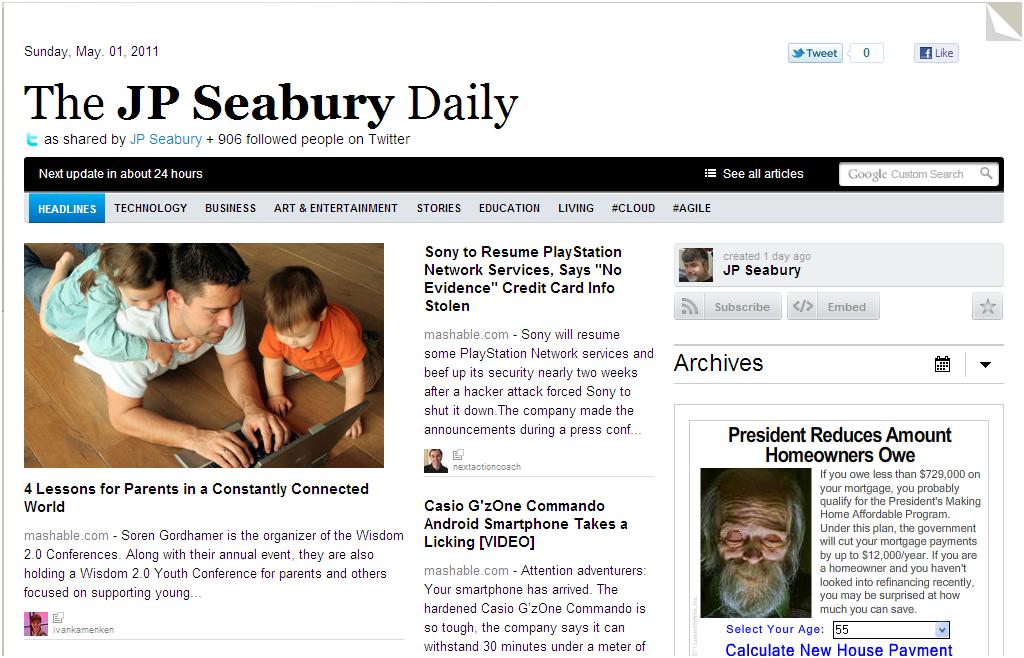
My Favorite Daily News Source: Twitter (via Paper.li)

If you are an avid tweeter, then I highly recommend you create your own Paper.li subscription. It’s free, and it’s a remarkable tool for delivering focused content, directly to your email inbox, in a daily electronic newspaper format.

Whenever I’m online, either at home or at work, I’ll invariably have Hootsuite up. It scrolls a constant stream of tweeters and search topics that are of interest to me: Cloud Computing, Salesforce, Comcast, Robotics, Project Management, Process Improvement. Hootsuite allows me to stay connected with peers and my “social community”, and find new connections with people who share my interests. But even though I’m somewhat selective in who I follow on Twitter, it’s still an extremely high-volume of content. It’s very difficult to keep up with that stream.


Enter Paper.li

Paper.li summarizes all of the content (links, articles, photos, videos) that were shared by the people you follow, and summarizes them into a daily newspaper format. Confession: it felt somewhat pompous to create a newspaper around my own name. I had to get past that, and remind myself that the daily newspaper content isn’t mine – it is stuff that was shared by all the people I follow on Twitter. It’s all packaged up in a newspaper format, delivered to my email inbox daily. The format is much easier to read than scrolling through a twitter stream at the end of the day. This daily feed has become one of my favorite ways to take in news and information.

Paper.li allows you to set the frequency of your newspaper feeds, including a Daily Edition (default), Morning & Evening editions, and a Weekly edition. You can even control the preferred delivery hour. Don’t you wish you had that flexibility with your regular newspaper?.

Paper.li inserts some advertisements throughout the newsletter. The ads are not overbearing or distracting; I’m able to ignore them as easily as I ignore advertisements in a traditional newspaper or magazine.


The result is a daily newspaper that has a refreshing mix of personal interest content mixed in with industry and work-related content. I truly love it!

Creating your own daily Paper.li newspaper is easy:

1.) Navigate your web browser to http://paper.li
2.) Click “Create A Paper” in the top right hand corner of the page
3.) Follow the prompts to create a paper based on:

… your Twitter account: the newspaper will consist of articles shared in the past 24-hours by yourself and the people you follow on Twitter.

… a hash tag (i.e., #salesforce): the newspaper will contain articles shared in the past 24-hours by all Twitter users, who associated that hash tag with the article

… a Twitter @list: select any Twitter list, your own or that of another Twitter user, and get a daily newsfeed of articles shared by those users

Note: If you have taken an approach of simply following EVERYONE who follows you on Twitter, you may want to prune your Following List. The newsfeed is much more relevant if it includes articles promoted by people who specifically share your interests.

Check it out, and let me know if it makes a difference on how you read and manage your Twitter following practices.

Friday, January 28, 2011

From Chatter Apathy to Chatter Fan in 30 Days

Meet Joe Onisick, a self-proclaimed “IT professional specializing in data center technologies with a focus on virtualization and private cloud architecture.” (I haven’t had the heart to tell Joe that there is no such thing as a private cloud – that it’s a myth, like unicorns and leprechauns – but perhaps we’ll broach that twitter conversation on a later date :-)

I jumped into a conversation with Joe when he spoke disparagingly of Chatter:


So here we have a well-educated, intelligent fellow, who finds real value in “public social media”. From reading his Twitter stream, I see that Joe expertly wields Twitter to find other business professionals, networks with them to get answers and solve problems. So how is it that he couldn’t see a similar benefit with Chatter?

Could it be that the Chatter deployment at his company did not have appropriate C-level executive sponsorship? Securing your C-level executive sponsor is critical in any organization-wide application. Someone “at the top” has to recognize that this corporate social media stuff has value, convince their peers that it will be helpful to the company, and provide the oversight to ensure that it is rolled out properly.

Perhaps there had been no training for the user community at Joe’s company. Let’s be honest – a good number of our friends, relatives and work colleagues simply don’t understand the power and impact of social media – or even what it’s good for. A corporate executive, whom I get to work with from time to time, refers to Facebook as “Wastebook”. He perceives it as a tool for idle minds and wants no part of it in the workplace. An organization cannot simply turn on a tool like Chatter and hope that employees will “get it”. Training, monitoring, and re-training must be part of your Chatter roll-out strategy.

Perhaps the deployment did not have appropriate attention by community moderators. Social media is only useful when there is wide participation. In public social media tools, like Facebook, LinkedIn and Twitter, there is an enormous community of active participants. But when you close the tool to a smaller community, it very often requires a moderator to monitor the micro-blogging stream, create and steer conversations to the appropriate discussion groups, and nurture the community until it is able to thrive on its own. Many corporate social media experiments fail, simply because there is no one there to lead the conversation and get everyone out of their SocMed shells.

I made a note to check back with Joe one month later. I wanted to see if there had been any change to his position on corporate social media. There had been:


From Chatter Apathy to Chatter Fan in 30 Days. Go get him, Robin Daniels, there’s a successful user story in there somewhere!

Saturday, January 8, 2011

Salesforce.com Acquires Dimdim - Why Is That Good?

This past week, Salesforce.com acquired Dimdim, a browser-based web conferencing service provider. Dimdim is a very useful app and I’ve used it to conduct webinars, User Group meetings, and training sessions for remote employees. As web conferencing goes, Dimdim included all of the basic functionality: ability to schedule a web conference, track meeting registrations, automatically send email reminders to meeting registrants … even the ability to record the web conference for later playback.

After the event, the web conferencing organizer would receive an email link, which he could immediately share with anyone – so they could view the recorded session and play it back at their leisure. Organizers also recedived an embedded HTML link, which they could paste into their blog or website, making the content of the meeting available to a general audience. Beyond web conferencing, Dimdim had other useful features, like whiteboard collaboration, the ability to share and store documents, phone conferencing, and webcam sharing.

I used Dimdim for a good number of Salesforce.com consulting projects that I was doing for Non-Profit Organizations. These organizations were attracted to Dimdim because it was the only free web conferencing solution available. The free version only supported 20 attendees, but that was perfect for their needs. The Pro version, which allowed a greater number of participants and more functionality, was only $25 / month. Very compelling, compared to other web conference vendors, which were in the $40 - $60 price range.

It’s clear that Saleforce.com is acquiring Dimdim for its technology, not its customer base. When giving me the heads-up about the acquisition, my Salesforce.com Account Executive was careful to mention that Salesforce currently has “no plans to go into the web conferencing market.” Shortly after that, I got an email on my free Dimdim user account confirming the same: my Dimdim account will remain active until March 15th, and after that I won’t be able to use it.

That doesn’t mean Dimdim will go away completely. Afterall, Dimdim is based on open source code, and an open source version of the code will be posted to SourceForge.net. However, neither Salesforce.com nor Dimdim will be contributing to the open source project going forward. Source: Brown, Rodney (2011, January 7). Mass High Tech: Dimdim sells to Salesforce.com for $31M.

Why is this good for Dimdim? In the press release, Dimdim CEO DD Ganguly summed it up simply enough, “From our start, Dimdim has focused on enabling real-time collaboration in the cloud, with no software. Salesforce.com gives us the opportunity to apply our expertise and align our vision of real-time, social enterprise software in the cloud – at a scale that wouldn’t have been otherwise possible.”

Why is this good for Salesforce.com? Good development talent is hard to acquire, and in just 3 years, Dimdim has done some very interesting, innovative stuff in the web conferencing space. Salesforce plans to retain the Dimdim engineering team, most of which are located in India. Although the standalone web conferencing service is terminating, the engineering team will focus on integrating “Dimdim’s technology with Chatter as quickly as possible.” Source: Henschen, Doug (2011, January 7). InformationWeek: Salesforce.com Acquistion Feeds Chatter .

Why is this good for Salesforce.com Users? Plan on seeing some new features in the Salesforce.com Collaboration Cloud service very soon: instant messaging (and being able to log those communications to a contact / lead / case), screen sharing (how handy will that be for your customer service team?), whiteboard collaboration sessions that can be recorded and stored in Content or Chatter Groups, training webinars (also recorded and stored for replay), and more. Great stuff coming!

Why is this good for Dimdim Users? Well, truth be told, it ain’t. There’s not one good thing about this for Dimdim users, and I’m sorry to see my Dimdim web conferencing user account go away. Individuals who used Dimdim for web-conferencing will look toward other web-conferencing solutions (Yugma/Skype, for no-low cost; GoToMeeting, WebEx, Live Meeting, iLinc or others for subscription services)

What about you? What are you looking forward to with the latest acquisition by Salesforce.com?

Saturday, January 1, 2011

Converting 10-Lines of Apex code to a 1-line Validation Rule Formula

Code clean-up is what I'm doing these days ... lots of code clean-up. One of our Salesforce.com orgs (we have sixteen of them) currently has 72% test coverage in production. I'm not sure how the previous administrators were able to install code below the 75% threshold, but they managed. I'm tasked with getting that code cleaned up, so I can deploy a new release.

While looking for areas to improve code coverage, I stumbled upon this trigger:

trigger checkAccountPhoneNumberBiBu on Account (before insert, before update) {
   for (Account account : Trigger.new) {
      if (account.Phone==null) continue;
      Pattern p = Pattern.compile('[-() ]');
      String sPhone = p.matcher(account.Phone).replaceAll('');
      // check length without punctuation
      if (sPhone.length() != 10) account.Phone.addError(' Phone number must have 3 digit area code and 7 digit number');
      p = Pattern.compile('\\d');
      sPhone = p.matcher(sPhone).replaceAll('');
      if (sPhone.length() > 0) account.Phone.addError('Phone number must be formatted as (999)999-9999');
   }
}


This trigger looks at the value entered in the "Phone" field before an Account record is inserted or updated; if the phone field is not in the (999)999-9999 format, it errors out and notifies the user to enter the phone # in the proper format.

In addition to this Apex code, the developer also had to write a testmethod to ensure coverage of the trigger. His code was only getting 67% test coverage (which is what brought the trigger to my attention in the first place).

As I started looking at what I needed to add to the testmethod to ensure 100% coverage, I realized it would be easier to just get rid of the trigger altogether, and replace it with a Validation Rule. That 10 lines of Apex code was reduced to a 1-line formula in a validation rule:

NOT(REGEX(Phone, "\\D*?(\\d\\D*?){10}"))

Here's the validation rule in the UI:


Simpler is always better. Any time you can minimize your code (or get rid of it altogether), you make your org simpler, smaller and eaiser to maintain. I'm a fan of that.

Another benefit of implementing this as a validation rule is that I'm able to control where the error message is displayed. Previously, the trigger method displayed the error message at the top of the detail record page layout.  With validation rules, you can display error messages either at the top of the screen or at exact field where the error was made; I generally prefer the latter.

Want to see this and other useful validation rules? Check out the Useful Validation Formulas guide by Salesforce.com.

Sunday, December 19, 2010

Why the hate for Salesforce.com CRM?

I love Salesforce.com, that’s no secret. Fellow employees meeting me for the first time often ask if I’m a Salesforce.com employee. That’s because I tend to evangelize it’s use in every aspect of our business, and am vested in ways of extending its functionality throughout our organization – even beyond CRM. I’ve made it my job to know everything I possibly can about the Force.com platform and how it might benefit our business. I know I’m not the only one like me; I had an opportunity to meet plenty of Customer Evangelists at Dreamforce this past year, and of course there are the folks I regularly interact with on Twitter, the community forums, and now the Dreamforce Chatter app. But I always wonder if there are product evangelists who love competing CRM products as much as I love Salesforce.com.

Meet Leon Tribe (@Leontribe on Twitter), a Microsoft Dynamics CRM Consultant based out of Sydney, Austrailia. He has a blog, Leon’s CRM Musings, which he has been writing since 2008 (at about the same frequency and volume that I’ve been writing my Force Monkey blog). It’s a good blog, and worth reading. It is a Dynamics CRM blog, “focusing on a functional perspective and from the perspective of making codeless changes”. While reading his blog, I was amused at how frequently (and damningly) he talks about Salesforce.com (less so in 2010, but much more so in ’08-’09). Why is that, I wonder? I never talk damningly (or frequently) about Microsoft Dynamics CRM. Where does all the hate come from?

I came to be aware of Leon after browsing the latest #Salesforce Daily Paper.li newsletter.

SIDEBAR: If you don’t already know about Paper.li, you should check into it: http://paper.li/introduction.html. Paper.li is a news aggregator, similar to Flipboard. When you sign up for the service, you specify a Twitter hashtag (like #Salesforce). Thereafter, you will receive daily news updates from Twitter mentions that include the #Salesforce hashtag and a news article. I’ve subscribed to Paper.li feeds on: #Salesforce, #Privacy, #Security, #Lego and #Robotics.

Anyway, back to Leon … I discovered him and his blog after he started adding the #Salesforce and #df10 hashtags to Microsoft Dynamics CRM related news articles, like these:


These tweets cause the related Dynamics CRM news articles to populate the #Salesforce Daily newsfeed. That reminded me of the silly marketing tactics employed by competing CRM vendors at Dreamforce: the SugarCRM carolers and the Microsoft Dynamics “I Didn’t Get Forced” Sequay Brute Squad. At his Day 2 keynote, Marc Benioff said, “Not everyone wants us to have this fun. There are forces out there that are trying to stop us. They don’t want us dancing to Stevie Wonder. They don’t want us dancing to will.i.am, and singing to his “I Want to Own It” song.”


It's true. And while I spend very little thought on their CRM world, they seem to spend a lot of attention on ours.

But I’m still left to wonder – do the Dynamics CRM product evangelists have as much fun as we do? Is TechEd, the annual Microsoft User Conference, as much fun, energetic, and informative as Dreamforce (it should be: at $2100 for just the conference, it’s double the cost)? At TechEd, do Microsoft customers get to hang around the pub with Microsoft Developers, as I had a chance to do this past week at Dreamforce?  Does TechEd have as much music, energy, and fun as the Dreamforce Global Gala?  Is their community as connected, invested and friendly as ours is?

I have to believe it isn’t, because you can’t be having a lot of good, clean, wholesome fun if you’re spending so much of your time damning and lashing out at the competitor’s CRM product.

Saturday, December 11, 2010

Salesforce Schools Oracle in Ad Sign Campaign

This past week was the annual Salesforce.com User Conference, Dreamforce 2010. In advance of the user conference, CRM rival Oracle purchased advertising space across from the Moscone Center, where the convention was being held.


Picture courtesy of Woodsin Martin, SVP at Salesforce.com, who quips, "Not sure who does the ad copy at Oracle, but they might need a fact-checker."


Salesforce.com put their own ad up across from the Moscone Center soon afterwards, letting their customers know who they thought the REAL #1 was:


Yes, the Customer is #1, according to Salesforce. Oracle, you've just been schooled.

Wednesday, December 1, 2010

Dreamforce: Tips for First Year Attendees

Dreamforce is just a few days away, and at the prompting of my good friend David Schach, I wanted to take a quick moment to help folks who are attending Dreamforce for the first time.


My first Dreamforce: I was lost. I mostly "followed the crowds" and hoped I was heading in the right direction. Here is a list of things I wish I had known that first time:


1.) Check-in early. My Salesforce AE recommended I check in the day before the conference ("go ahead, they're open now, go over and get your badge") and I'm so glad I did. There were a dozen people behind the counters, and only myself to be waited on. When I saw the huge lines the next AM, I was so thankful that I had checked in early.


2.) To the extent that your allowed to explore the Moscone on the day before, take advantage of it. The corridors aren't filled with thousands of people moving between break-out sessions, and you're likely to make a few friends.


3.) Arrive early and get a good seat. I like to be near the front, but not so far forward that I don't have a good view of the presentation screen. Never sit on the isle, always move to the middle. That doubles your chances of striking up interesting conversations with folks on either side of you.


4.) Don't be shy. This is a Users Conference, and you'll get the most benefit from it if you make eye contact, smile, and get to know your neighbor. Find out what they do, who they work for, how they use the platform, how many Dreamforce sessions they've attended. If they are a veteran, ask them for THEIR tips and suggestions.


5.) Bring lots of business cards. Just bring the whole, gosh darn box. You'll probably need it. When you get a business card from someone else, jot notes on the back or face of the card: where you met, what you talked about, etc. Get that information into your favorite CRM at the end of the conference! Send them an email follow-up after the event, referencing whatever notes you took about them at the conference. This is CRM 101, but rather than creating relationships with Customers, you're creating realtionships with the Salesforce User Community -- which has a TREMENDOUS value. It is well-worth nurturing.


6.) Have a plan (I really wish I had made one!). What do you want to accomplish? Who do you want to meet? Which vendors do you want to see and get first-hand demo's from? This is the place to do it.


7.) If you know certain people are going to be at Dreamforce, and you really want to meet them -- make arrangements in advance! With Chatter, there's no excuse to not reach out and make those connections now! Ask if they can get together with you for breakfast, lunch, dinner, coffee, drinks.

8.) This is the hard one, especially for a social media junky like me. Put the mobile device down. I mean it! Remember why you are at Dreamforce: to see the latest cloud-computing advancements (which admittedly, has some pretty cool mobile apps), meet interesting people, and gain long-term, productive relationships. BE SOCIAL. When waiting outside a session, or while sitting and waiting for the session to start, don't have your thumbs madly twirling on your mobile device. At the end of the session, avoid rushing out to the hall, only to flip out your phone so you can scroll through your email or messages. Instead: Connect. Engage. Interact.

9.) Introduce people you meet to other people who are joining your group late. I was delighted when David Schach introduced me to Scott Hemmeter (ArrowPointe), several Dreamforces back. Helping people make connections to each other will reward you with good karma, all the rest of your life.

10.) Dreamforce is like Disney. You can't hope to see it all, not in one visit. Don't even try, and don't stress out about it. Just enjoy thoroughly every part of it that you CAN see.

11.) Cloud Expo. Walk it, don't walk around it. Explore every booth! At my first Dreamforce, I confess, I avoided the expo floor like it was a leper colony. Not so on subsequent Dreamforce events. You can learn so much about ways to benefit your company -- just by having a conversation, looking at the solutions vendors have found for various problems.

12.) Have fun. Leave the office behind, it's just 4 days. They'll survive. Rock out at the Global Gala, get an invite to a vendor party, or have drinks with some new friends you made that day. This is YOUR conference, and you won't back back for another 11-12 months. Make the most of it.


Here are some tips and recommendations from other Dreamforce Veterans:

Brad Gross (@imperialstout): Biggest mistake newbies make is trying to do everything. Relax.
Deep into a conversation with another attendee? Skip that next session. Its recorded for a reason.
Expo people starting to bug you - run to the campground and sit in the Customer Hero theatre for a time out.

Oh and my biggest hints:
- Bring a water bottle
- Bring a coffee mug
- Leave the laptop
- Smile and smile often
- Show patience with the other attendees. For some this is their Disney (<-- That was for you Jeff)


David Schach (@dschach): Bring breath-mints. The coffee is good, which means that we're all drinking it. So be kind to your neighbor and pop a TicTac.


Jeff Grosse (@crmfyi): "Don't worry about getting to a session during every time slot." Breakout sessions are fantastic, no doubt. Something to keep in mind though is that all but the roadmap sessions will be available for future viewing on video where you can listen, pause, take notes, and take it in at your leisure, either by yourself or as a team. The time you have at Dreamforce should have a balance of the must-have sessions and time spent in the Expo talking to vendors, in the Campground talking to cloud experts, and in general, talking to everyone else at Dreamforce. Those are things you can't reproduce at home and require your time and attention wile you're at Moscone.


Michael Gerholdt (@mikegerholdt): My word of advice- Plan your Cloud Expo experience. Last year, when I arrived I glanced over the vendors that were exhibiting and marked off the ones that I needed to see. Then when I had a change to go to the expo I visited them first and marked them off my list. Once I had the information I needed I could wander around and sign up for the fun freebie stuff. It's easy to get caught up in all of the free iPads and flip cams, but remember you should come back with valuable information for your company. [As a side note, my coworker at the time did the opposite, and was very disappointed that he didn't get to meet the vendors he needed to interact with.]


Got your own tips and recommendations for First Year Attendees?  Mention them below!

Monday, September 13, 2010

Salesforce Updates - Sept 10, 2010

#Dreamforce


Count Down: @RatherGeeky reminded me that there are only 83 days until Dreamforce 2010. Have you registered and booked your reservations? This will be the biggest Dreamforce yet, with more than 20,000 attendees! Register here…

Community Conference: One of the things I love most about Salesforce.com is the overwhelming strong support I get from the user community. There are thousands of active community users who are writing Salesforce blogs, creating or promoting new feature enhancements on the IdeaExchange, participating in local user groups, asking and answering questions on the Answers forum, and collaborating on the community forums. This year, at Dreamforce 2010, we’ll have a chance to all meet each other. Dreamforce 2010 will have a community meet and greet! Read more…


#Administrators

150 (or rather, 32) Steps to Salesforce Greatness: AvideonCRM published an article titled “150 Steps to Salesforce Greatness”. The article actually only lists the first 32 steps (which is fair: the consulting company needs to keep some trade secrets!). Trying to figure out where to start with your new Salesforce.com setup? Check out this article! It has some great starting tips. Read more…

Mass Emails with Salesforce.com: What is the best way to do mass emails with Salesforce.com? Check out this article by @TFrankfurt; in the article, he talks about the current limitations of mass emails through Salesforce, and shares some popular AppExchange Email solutions to help break past these barriers – very helpful blog! Read more…
 200+ Free Salesforce Apps from Force.com Labs: Force.com Labs has been crazy busy the past few months, churning out new apps on the AppExchange – all free. The best thing about these apps (aside from being free) is that they are open source. Sometimes I’ll take these apps and use them just as ideas for other apps that my org needs; sometimes the apps give me ideas for optimizing code that for other apps that already exist within our org. Either way, if you’re not familiar with these apps, you should probably spend some time to get acquainted with them. Check them out here…


#Developer


Force.com Developer Meetup in Chicago: Salesforce.com is hosting a Developer Meetup at the Summit Executive Center in Chicago, IL this Wednesday (9/15) from 6:00 PM – 9:30 PM. There are two tracks planned: Intro to Force.com Workshop and a session on developing Chatter Apps. Quinton Wall and Reid Carlberg will be guest speakers at the event. If you are local to the Chicago area, and have wanted to learn more about developing applications on the Force.com platform, this meet-up will be a great intro! Read more…

Learning How to Code: “I want to learn Apex and Visualforce and all that other stuff, but I don’t know where to begin.” Apex is a structured programming language, very similar to Java. Visualforce is a structured mark-up language, very similar to HTML. If you don’t already know the basics of these topics, jumping in to Apex / Visualforce programming can be a challenge. Google can help! Check out these tutorials on learning HTML, CSS and Javascript from Google. (Thanks, @CRMFYI for the link!) Read more…

Use Visualforce to Add Inline Google Maps to Account / Contact Page Layouts: This is an oldie, but a goodie (that I rediscovered this past weekend). @phollo wrote a blog showing how to add Inline Google Maps to your Salesforce.com page layouts. It’s a great article, complete with sample code. Read more…


Cloud Computing for Java Developers Webinar (VMforce): Jeff Douglas wrote a great review of the recent Force.com webinar, “Cloud Computing for Java Developers”. I’m really looking forward to the REST API that will be piloted in the upcoming Winter’11 release! Read more…


Sunday, September 12, 2010

How Do You Follow?

One of the folks I follow on Twitter was worried about "false Twitter followers" -- those nefarious persons who follow you, get a follow back, and then unfollow you.  It lead to Twitter conversation on the left pane.

On Twitter, I tend to follow and unfollow people quite a bit.  For me, Twitter is like a giant "internet users conference".  I wander around the conference floor, evesdropping on various conversations taking place. 

When someone comments (or rather, tweets) on a topic I am particularly interested in, I'll click on their Twitter stream and check out their other recent tweets.  If they are noteworthy or interesting, I'll follow that person. 

Over time, the topics I am interested in may change and I may suddenly "unfollow" individuals who are tweeting on topics that no longer interest me.  The act of "unfollowing" is not meant to be a slight or insult. 

The "unfollow" is not necessarily permenant -- I'm just wandering over to a different section of the "internet user conference" floor to listen to other conversations.

I use Twitter as a tool for sourcing new information.  The individuals I follow provide that information, in the form of quotes, updates, or links to interesting blogs or news articles, or even just entertaining comments throughout the day. They are sharing relevant content that interests me.

And if they unfollow me (or never follow me)?  No big!  I get value from the content they share, not from their act of following me back.

How do you follow and unfollow on Twitter?

Sunday, August 29, 2010

Who Is More Excited About Upcoming Winter'11 Releases, Salesforce.com Users or Microsoft Users?

Jeffrey Schwartz (Redmond Channel Partner, Editor-at-Large Redmond Magazine) wrote a recent article for Redmond Channel Partner Online, titled Dynamics CRM Facelift Brings Confidence to the Channel. I read the article, hoping to get some insight about the upcoming "Salesforce.com Challenger", but I think I'd be discouraged if I were a Microsoft partner. The whole article seemed to be an endorsement for Salesforce.com.

Here were some of my favorite quotes:

""I just went on a call for CRM and the VP of sales just keeps pushing Salesforce, Salesforce, Salesforce and he'll find a flaw in anything else no matter what you implement," says Jeffrey Goldstein, managing director of New York-based Queue Associates Inc., a Gold Certified Partner.
Forrester Research Inc. analyst William Band says while Microsoft Dynamics CRM has gained appeal, outpacing Salesforce.com could be a high bar to clear.
"In order for Microsoft [Dynamics] CRM to become a billion-dollar business, the market has to grow more or somebody else has to lose a lot of market share," Band says. "I don't know that there's that much space in the marketplace for Microsoft CRM to get that big. I don't know where another billion would come from."
A further source of frustration for Goldstein is the $49 per month price tag for Microsoft Dynamics CRM Online, which he says is far less expensive than Salesforce.com, yet customers aren't swayed by that. Price and feature comparisons are not the issue, Goldstein says. "The problem we run into is so many VPs of sales and ex-sales people just have a history with Salesforce. They just ask for it by name and they just refuse to use anything else," he says.

So what's in this upcoming release for Microsoft CRM 2011?  According to the article, here are the key features:

"Outlook Integration: Users can manage their CRM interactions from within Outlook. CRM data can be treated like any other Outlook data.

Ribbon: The Office Ribbon added to the new Outlook also will be added to the new Dynamics CRM client.

Role-Tailored Design: Users access relevant forms based on their role in the organization and are restricted from accessing data they're unauthorized to view.

Inline Data Visualizations: Users can create charts, drill down into them and share them.

Real-Time Dashboards: Customers can provide real-time dashboards to assess business performance.

Solutions Management: Developers and IT managers can package up all customizations and install them into the system and they can stay protected from others inadvertently overwriting them.

Field-Level Security and Record-Level Auditing: Important to any organization where privacy and/or compliance are required."

This isn't exactly material that will steel market share from Salesforce.com.  These features have been standard with Salesforce.com for more than 5+ years.  By comparisson, in it's upcoming Winter'11 release, Salesforce.com is deploying:

Chatter: Probably the most talked about Salesforce.com feature in the past few months, Chatter asks the question, "What are you working on?" It brings social media into the CRM tool, giving Salesforce.com a Twitter or Facebook like facelift. It seems to be making a real difference in user adoption among the companies that are deploying it in production.

Outlook 2010 Integration: This release will have a number of key (and much needed) improvements related to Outlook 2010 integration, including: email added indicators, improved Outlook administrator settings, increasing # of characters supported in the Subject field, 64-bit OS Support, simpler synch features and scheduled sync functionality.

Reports, Dashboard Improvements: Salesforce already has very powerful reporting and analytic features built in. In the Winter'11 release, there are a number of improvements targeted toward this Salesforce.com feature: drag & drop report columns, drag & drop dashboard features, improved report sorting functions, ability to run Dashboard reports as "current user", ability to change the running user in real-time, improved chatter integration, and more.

Improved Search functions: ability to search Content (document libraries), improvements to the advanced search features.

Improvements to the Change Sets deployment features

Improvements to Sites (web site hosting inside Salesforce.com), including support for 30x redirection

These are just a few of the features that Salesforce.com is rolling out at the request of Salesforce.com Customers (via their IdeaExchange forums). On top of all this, we're going to see some nice new functionality related to VMforce, Chatter, calender scheduling, consoles, and more.

Salesforce.com weighs in with a heavier price tag, but it remains easier to implement, easier to customize, and contains more functionality "out of the box" than it's Redmond competitor.  Salesforce.com remains my preferred CRM in the competitive marketplace.

Tuesday, August 17, 2010

Salesforce CRM Talent in High Demand

The unemployment scenario may be grim, but Salesforce.com CRM Talent is in high demand. 

Erik Palumbo is a corporate recruiter at ModelMetrics, Inc.  They're looking for a Salesforce.com Technical Architect, and finding it to be a real challenge. He has posted to multiple LinkedIn user groups, tapped his traditional network for talent acquisition, and says he's finding "little interest".

I wouldn't categorize it as "little interest", but rather "supply and demand". Salesforce.com is hot right now.  Admins, Developers, Technical Architects, Contractors, and Consultants are in short supply. David Taber commented similarly in his recent CIO article, "The CRM Talent Shortage: Here, Now".

I have also heard this repeated in the local Salesforce.com User Group meetings I facilitate and other CloudForce user conferences I attend.  At Comcast, I've been helping our HR department find additional Salesforce.com talent, and it's been challenging for us, too.  The number of personal calls and emails I've received from recruiters is up sharply in the past two months, averaging 3-5 per week.  It's really surprising!

I gave Erik many of the same recommendations I gave my corporate HR department:

1.) For LinkedIn job postings, I recommend the Salesforce.com Professional LinkedIn Network.  It is one of the oldest LinkedIn Groups, and is managed by Salesforce.com employees (Jeanine Thorpe, Erica Kuhl, Tom Wong, and Jamie Grenney).  It's the forum were Salesforce.com posts their own job opportunities, as well.

2.) The Salesforce Community discussion boards have a Job Board for Admins and Job Board for Developers.  You may find a pool of candidates there, who don't frequent or participate in LinkedIn groups.

3.) On one of Erik's job descriptions, I read that he didn't want to be contacted by 3rd party / recruiters. In Erik's case, that makes sense: he IS the corporate recruiter for his company.  For most other companies, I would encourage they use recruiters.  Don't be fooled by this crazy job market.  Even though unemployment is high, skilled Salesforce.com CRM talent is in great demand.  You may need to work harder at luring those candidates toward your company.  A technical recruiter may be your best bet for filling an internal Salesforce.com Ninja position quickly: you need a hunter to help you find the right talent.

4.) Consider spending your budget dollars to TRAIN the right candidate, rather than RECRUIT the right candidate.  Don't wait for Salesforce.com talent to fall from the Clouds!  You may find it easier to find someone that has some of your core requirements, and put them through a rigorous Salesforce.com Boot Camp program.  Find a talented business analyst / java developer / project manager, and introduce them to Salesforce.com.  Put that firehose right down their throat and have them drink deep.  For the near term, this may be the best chance for getting your internal Salesforce.com job postings filled quickly.

A final note to employers who already have Salesforce.com talent: hold on to them.  I don't see this CRM talent shortage ending soon.

Good luck!