Friday, November 30, 2018

Resolving "Read All Accounts" Permissions Issue with the "old" Profile Editor

Problem / Issue: 

As part of a project to enable Lightning Knowledge for an org, I was tasked with doing some clean-up of various user Profiles in the org. An audit found that the Data Migration profile had access to the Knowledge object, but shouldn't have. When I went to remove these permissions, Salesforce presented an error (see below): I couldn't remove access to the Knowledge object until I first resolve the permission issues on Account Brands and Scorecard Associations.  


No problem -- this Data Migration Profile shouldn't have access to either of those objects either, so I thought I'd just go remove them. The trouble is that if you're using the Enhanced Profile Editor, you can't make permission changes to multiple objects.

For example, as soon as I went to make remove access to the Account Brands object, Salesforce presented an error: I couldn't remove those permissions until I first removed permission from the Scorecard Associations object:


Similarly, if I tried to remove permissions from Scorecard Association, I got an error saying I had to first resolve the access permissions on the Account Brands object.

It took me a few cycles to figure out that the problem here is that unlike the original Profile Editor, the Enhanced Profile Editor doesn't allow you to make changes to 2 or more objects at the same time. Each time you make a permission change to an object, Salesforce will validate the change before allowing you to save the change. But I needed to make changes to two different objects, and the Enhanced Profile Editor wouldn't allow me to do that. 

The Fix

You need to revert back to the old Profile Editor, since it allows permission changes to multiple objects before a Save operation is committed. To revert back to the old profile editor, go to Setup and in the Quick Find type and select "User Management Settings", then disable the "Enhanced Profile List Views" setting. You can come back and enable this setting after you have made the necessary profile permission changes. 

So if you're running into problems with profile editing, keep in mind that the old Profile Editor was kept around for a reason -- there are simply some things you can't do in the new Enhanced Profile Editor mode.

Tuesday, September 4, 2018

Getting to #AwesomeAdmin 2.0


Are you able to easily relate to any of these situations:

I have a meeting next week that I know will be tough. The sales team wants a new way to track their quarterly results, their just not able to articulate exactly what they want. In past meetings, they've quickly gone off track, and I wasn't able to fully capture their need. Or, ...
I'm facing some new challenges within our production org. Our traditional deployment process isn't quite working. We're letting things into production that we really shouldn't, but I'm not sure how to fully address that. Or, ...
Even though we're not using Lightning yet, I think I'd be a better admin if I just knew a little more about lightning components and how to design them. Or, ...
I've just been assigned a new salesforce project that is quite larger than my last one. There are new stakeholders, and it's going to require some development work that will really stretch my modest apex and visualforce skills. I think I can do it, but I'm not really a salesforce developer. I don't want to miss anything.
Or ... [insert your challenge here]

These are all challenges or problems we are likely to stumble upon at some point in our career. As Salesforce Admins, we LOVE solving problems. But we mostly love coming up with creative solutions for OTHER people's problems. Having to come up with solutions for our own personal problems isn't nearly as much fun.

But at the end of the day, the same talents and skills that allow us to create solutions for business leaders and their teams can be used to solve our own personal challenges and problems.

#AwesomeAdmins Turn Challenges Into Professional Development Opportunities

Every challenge you face is a new professional development opportunity. It's an opportunity because it presents you with a fresh, new chance to grow and learn.

Each time you tackle one of these challenges, you'll come away with a unique business understanding, newly applied learning, and increased personal skill sets. At the time, they may seem like incrementally small skills, but all those small changes add up over time.

Becoming a better Salesforce Admin simply involves managing your professional development opportunities, one after another. And then another. And then another.  There's no shortcut to awesomeness. You get there incrementally, by overcoming each fresh, new personal challenge. By learning and succeeding (or even failing!) with new approaches. Your goal isn't to get a raise or land a big promotion at work. Your goal is to become better at your craft. You accomplish this be facing professional challenges head on, big and small, and growing through them.

Here's the good news: you don't need to go to a week-long salesforce training class to become a better admin (although it can definitely help). You don't need to get a Salesforce Admin certification (although this can help, too!). You don't need to go to Dreamforce, attend a Salesforce User Group meeting, or even spend a lot of extra time out of the office to become a better Salesforce Admin (although many of us enjoy the camaraderie from ALL of these things).

Awesome Admins Fix Problems – One at a Time

So, how do you go about tackling that growing list of professional development opportunities? Really, the same way you tackle any work challenges:

  1. Describe the problem clearly. Give it a name. Write it down. Maybe throw it up on your own personal Kanban board (Trello is GREAT for this). For those challenges above, you might name your challenges: Run a Better Requirements Gathering Meeting, Create a More Robust Deployment Process, Learn How To Build Lightning Components, Tackle Project X
  2. Brainstorm ways you might address the challenge in a new way. If this is a team problem, then brainstorm with your team. Even if it's a personal challenge, you can reach out to your social networks (Trailblazer Community, local user group, Twitter, etc.) to solicit ideas.
  3. Got a collection of ideas? Good! Invest some time learning something new about each approaches. Maybe one of the ideas was to tackle this problem using Flows, and another was to use Apex -- neither of which you're strongly familiar with. Dedicate time to learning about both. You don't need to learn EVERYTHING about the approach, just spend 15-30 minutes learning about the approach to help you evaluate if it's a practical choice.
  4. Decision time: select whichever seems to be the best solution. Commit to trying it.
  5. Start working through the solution. If the challenge is particularly large, break it up into smaller manageable chunks. In this way, a big challenge becomes many smaller ones. That may seem more intimidating at first, but each is more achievable. As you complete each smaller objective you'll be working toward the larger goal, but also building your accomplishments (and thereby, your confidence), along the way.
  6. Stuck? Ask for help! It's ok to reach out to your manager, peers, or salesforce ohana to solicit input or advice as your working through the solution. Never feel like you need to go at solving a problem on your own, even if you're the only knowledgeable salesforce resource in your company!
  7. Assess your results periodically. Reflect. What worked? What did not work? Capture this in writing!
  8. Do it again. Repeat this cycle, every day, every week, every month.

Invest a bit of team each week to tackle your personal challenges. Your mindset about dealing with them will shift as you take the same disciplined approach you take for all other business challenges. As you make progress, your confidence will grow. Your skill set will grow. You'll be increasing the value you provide to your organization. And you'll be upgrading to a better, improved version of yourself: #AwesomeAdmin 2.0

Tuesday, August 21, 2018

Getting Support for your Salesforce Ideas in the Workplace

Sometimes, it can be a little intimidating being the Salesforce Admin for your company. On a daily basis, you are interacting with professionals and executives at all levels of the organization. They expect BIG THINGS from their investment in Salesforce, and in turn, their investment in you. Your job is to not only ensure your salesforce org runs smoothly, but also to help your sales and service teams be more productive, to help them do their  job BETTER.

You’re a particularly devout salesforce administrator, tuning in to webinars, reading blogs, interacting with peers on the Trailhead Community forums, and following your salesforce ohana on Twitter, Facebook and LinkedIn. A steady stream of salesforce-related information enters your brain every day. And every so often, you’ll see something that REALLY excites you! 

Perhaps you read about how another Salesforce Admin switched their organization from Classic over to Lightning. Their approach seems fairly straight forward, and one that you could replicate at your own company. Or maybe you saw a really interesting use case for a salesforce community, and you’re convinced that will greatly enhance the customer experience. Or you’ve seen a new feature in Salesforce, like Lead Scoring, which you’re certain will improve the sales user experience and help the company close more deals. Wow -- now you’re really pumped. 

But then a big old dose of Monday morning reality settles in. While you know that implementing new approaches can drive innovation and help your organization succeed, you also know that for a lot of people, change is not easy. We humans are highly resistant to change. Ok, maybe not us admins -- we love change, at least three times year, #AmIRight? But the user communities we support are often a bit more reluctant. Bureaucracy, emotions and plain old stubbornness get in the way so easily. 

So if you have this great idea to enhance your salesforce org, how do you get the support you need to push it forward? How do you effectively share your idea, build momentum for it, win support from your executive leadership and empower the right people to implement it? 
Here are some #MondayMusings for strategies I’ve used to gain support for my ideas. Consider using these techniques when you’re looking to garner support for your salesforce ideas.

Step #1: You’re a Salesman, Craft Your Elevator Pitch

I’m a believer that all of us are salespeople. That may not be our job title, but you’re involved in selling every single day.  As a Salesforce Admin, you are already  selling your expertise and skill set to your organization every day. A significant amount of your time is spent persuading, influencing and convincing others to make an exchange of some sort.

Just as a salesperson hones their elevator pitch for a busy prospect, so too do you need to craft a quick pitch to sell your business ideas. You’ve likely heard of the elevator pitch concept already. An elevator pitch is a brief, to the point proposal, something that can be delivered in 15-30 seconds. That’s the time you might have to share with an executive sponsor as you incidentally meet her in the elevator, and travel the elevator banks together to whatever your shared destinations might be. In the time it takes that elevator to move 50 floors or less, you want to be able to delivery your pitch and sufficiently garner their interest so as to encourage a follow-up meeting.

Each unique idea or proposal you have warrants it’s own 15-30 second pitch. The idea itself will almost certainly be more complicated than can be fully conveyed in 30 seconds, but it’s important to tune your pitch to that brief, succinct delivery time.  

The pitch isn’t something you mentally whip up in your head during the morning commute. While it should only take a half-minute to deliver, you’ll need to spend a good amount of time working the details behind the pitch BEFORE you deliver it. You must translate your excitement, enthusiasm and interest into a clear, solid business proposal. Don’t skimp on this step. Really think it through. The more prepared you are with it, the more successful you’ll be in the delivery. 

What’s in a good pitch?

  • Be brief and to the point. 15-30 seconds max.
  • Clearly articulate the problem you’re solving or the process you are improving
  • Explain WHAT the problem or issue is and HOW your approach addresses it
  • Present facts, including the approximate costs (resources, time, budget), as well as the business costs of NOT implementing the solution
  • Keep assumptions to a minimum; don’t clutter the pitch with confusing “admin-only” terminology. I take out a lot of Salesforce phrases in my pitches (Einstein becomes AI, Lightning becomes “improve UI”, etc.). You need to talk the same language as your audience, which is often very different from that of your salesforce ohana.
  • Be ready to go into additional details, but only if requested (usually at a later date or during a follow-up meeting).


You may find, through this exercise, that the idea really is too costly, or won’t yield the benefits you originally thought it might. It’s better that YOU make that discovery at this early stage, rather than having someone from your executive team bring you to that realization.

Or the opposite may happen, and you may find yourself more convinced than before that his action is critical for your organization. That conviction will only help you as you present your elevator pitch to the leadership team.

Step #2: Get Feedback Early

You’re smart. I mean it -- really smart! That’s why you’re a Salesforce Admin! But it doesn’t matter how smart you are, no great idea will come together in an echo chamber of your own brain. After you’ve crafted your pitch, perhaps even rehearsed it a couple times in front of the mirror or during the morning commute, present it to some trusted colleagues -- or perhaps some of your salesforce ohana. Talk it up with peers at your next UG meeting, or sync up with friends on #SalesforceSaturday. Here’s an open invitation to pitch your elevator proposal to me; I’m happy to give you some open, honest feedback (reach out to me on LinkedIn or Twitter to exchange contact details). Don’t be shy about pitching it to a frequent naysayer in your circle, someone who isn’t as big a salesforce enthusiast as you are. You will hone your negotiating and presentation skills as you win these personality types over!

The important thing is to seek out people who can be critical, and are willing to give you open, honest feedback about your idea. You’re likely going to get one shot when you pitch this idea to decision makers, so get some early feedback from your “friendlies” first. 

Make sure you’re getting REAL feedback: you want something more honest than “great job, they’ll love it” and more helpful than “this sucks”. Press for the feedback that will help you make the pitch better. 

Now here’s the hard part: when you do get the RIGHT feedback, you may not like it very much. You may not like it at all. Some of it might be downright discouraging. Just remember the reason you approached these evaluators in the first place is because you WANTED their input (good and bad) so you could use it to refine your pitch. 

It is important to get feedback from several different people. Giving your pitch to 3-5 different people will allow you to identify trends or patterns in the feedback. If one person out of five hates it (but can’t quite tell you why), two people give you some creative suggestions for refining the pitch, and two people give you only minor suggestions for improving it -- maybe you have enough feedback that you can discard or ignore the hater. Or maybe you press that person hard to help explain where you’re losing them in the pitch, why your numbers don’t make sense for the business, or what specifically they don’t like about the idea. 

Step #3: Share It With Your Boss

You’ve crafted your pitch. You’ve shared it with a few resources. That has allowed you to refine the pitch and make it better. Now it’s time to share it with your boss. 

NOTE: For some organizations, it may be politically important to make this Step #2 rather than Step #3. Your boss may not want you going out and “stirring up ideas” before passing them by him first. Use your own discretion. Where I work, I feel comfortable sharing my ideas with a couple different groups before presenting the pitch to my boss. He seems to appreciate that, as well, because it means I’ve already filtered out some of the “noise” (some of my pitches die at step 1 or even step 2, based on the feedback I get).

The approach you take when presenting to your boss will usually vary, depending on the size of the project. For something rather small or benign, but still widely impacting, I’ll bring the 15-30 second pitch in as part of my weekly 1:1 meeting with my boss. 

(You ARE having a weekly 1:1 meeting with your boss, aren’t you? If you aren’t, get that recurring meeting on the books right away!). 

If he’s interested, and wants to go into more detail, I’ll be fully prepared to go into the more detailed action plan (yes, that means I’ve already done some of Step #4 BEFORE doing Step #3; as Edna Mode would say, “Luck favors the prepared”). Sometimes, we might dedicate the entire meeting to that one idea, so if I have a pitch ready, I always present it early in the meeting, not in the last 5 minutes. 

If it’s a particularly large endeavor, something that might have cross-platform or team impact, or create a significantly different user experience, I’ll reinforce that by being a bit more formal in my approach. I’ll tell my boss that I’d like to do a formal presentation to him, and potentially other members of the executive team. I’ll request a dedicated meeting where I can pitch the idea and take questions from a broader audience. Invariably, he’ll want to know more right away, so I’ll give the 15-30 second pitch -- but he’ll often stop me with a wave of his hands, and say, “Yep, this is bigger than a breadbox, let’s have on the invite.”

By reinforcing the need for a formal meeting, he’s already groomed to expect this to be a fairly large endeavor that will warrant feedback and input from a larger team. But he also has enough information about the idea that he can start “sowing the seeds” of interest among his peers, when they ask him about the invite they got from his Salesforce Admin. 

Ready for some more tough love? Here’s the sad truth: your boss might not like your aidea. Yes, even though you’ve gone through the exercise of creating your pitch, practiced it with a few key evaluators, and even worked out your “Next Steps / Action Plan”, your efforts might be stopped right here at the pitch to your manager. 

Keep in mind that your boss has a broader awareness of what is happening across the organization than you do. She is exposed to different circles of information and influence. She is also presented with a fair amount of sensible and practical ideas from other members on her team every week. It’s her job to filter those ideas and determine which are worthy of bubbling up to higher management or decision makers.

If you do get a “No” or even a “Not at This Time”, probe to understand why. Your data is sound, you have the facts -- find out what are the more pressing business needs impacting the organization right now that have greater urgency and greater ROI than this proposal. It’s important to make it not seem as if you are challenging your bosses decision. Rather, you are probing to understand the goals, needs and current priorities of the company, so you can better align your ideas toward them.

Step #4: Prepare Your “What’s Next?” Action Plan

One of my recent bosses gave every member of the team an 8.5” x 11” framed poster of a light bulb with the words, “What’s Next?” on it. It was a reminder, he told us, that wanted us to never be resting on our laurels, to always be looking toward the next problem that needed to be solved. That was two bosses ago, but I still have that picture hanging in my office. It’s become a personal mantra.

Ideas are nothing if you can’t execute them. Most likely, you’re going to need the support and resources of other individuals to move your plan forward. The larger the scope and impact of your project, the greater the amount of support and approvals you’re going to need from other teams or individuals. Be ready for that.

I list this as the 4th step, but in reality, I’ve fleshed out the outline for my “next steps” action plan before the meeting with my boss. I know the action plan will go through additional levels of validation and refinement AFTER the project is approved, but I want to make it easy to get started. I’ll detail as many of the subsequent required actions or approvals that I can reasonably think of, and jot them down. At this stage, I’m not putting a lot of details into the plan (no sizing of effort or setting of dates and deadlines). Otherwise, I’m being as specific as I can in naming individuals or teams, and what specifically is needed from them.

I can’t tell you that using this approach with every idea has resulted in gaining support for the idea in the workplace. But each time I’ve followed this practice, I’ve gained new insight into the needs of the business. I’ve practiced and improved my communication and project management skills. I’ve benefited from the networking and collaboration in pitching my idea with peers. Even if the work I’ve put into this doesn’t result in my GREAT IDEA being implemented, I’ve come out at the other end of the process as a better Salesforce Administrator.


Tuesday, August 7, 2018

What Happens When You Give a Salesforce Profile Permissions to No Apps?

In our current project, we're integrating Salesforce with a backend, user registration database for a mobile app. After users download the mobile app and register their accounts, their basic profile information (first name, last name, username, birthdate, etc.) is captured in a database. My service team wants these users captured in Salesforce as contact records.

One of our agile teams have implemented the database, and is pushing the data into Salesforce using REST API call-outs.

For the initial proof of concept, we gave them a Salesforce user account configured with a System Administrator profile. I know, however, that several team members now have the username and password for this integration user. It's time to move that user account to a new profile, and start locking it down -- so that it can only do what I need it to do: insert new registered users, and update Contact records (in case a user changes any of their information in the mobile app).

There are a number of settings I know I'm going to want to set -- like preventing the password from expiring for this data migration user. I'll also want to set profile so that users can have API access only -- no ability to login via the standard salesforce login pages. There are probably a bunch of other settings I'll want to make, too. I figured the best way to start was to look at the profile, and review it's configurations top to bottom.


The first config setting to go through was Assigned Apps. Now I know that this profile is going to be eventually locked down so that it can only access salesforce via the API -- but what happens if some future admin removes that setting? If users do somehow get access to salesforce via the standard login page, I want their actions to be highly restricted (this org may contain sensitive information; and I want to make sure the profile can only access the things it needs to access).

But what happens when you give a salesforce profile permission to NO apps? I didn't know -- and a quick Google didn't turn up much either. So, I config'd it up.

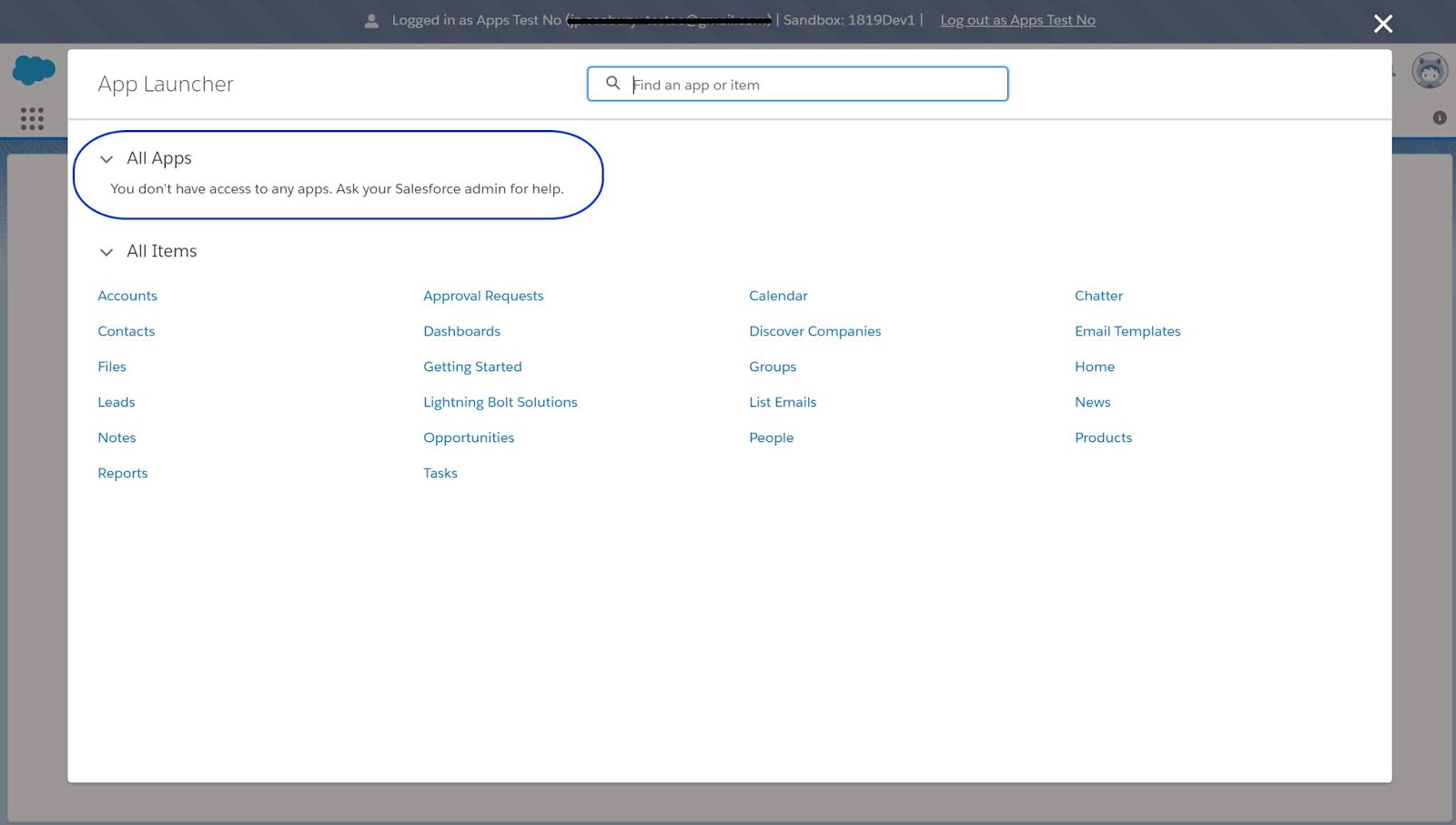
As it turns out, it's not possible to give a profile permission to NO apps. You have to select at least one. So I gave my Data Migration profile permission to the App Launcher only. That had the desired result: clicking the app launcher menu showed no available apps for the user to select from. That's just want I want.


Now to whip through the other config settings.

Thursday, March 8, 2018

Messaging with AI Driven Chatbots

Chatbots are a class of intelligent, conversational software agents activated by natural language input.
A chatbot is a service that you interact with via a chat interface. Texting on a console or speaking directly ala "Alexa" or "Siri" are common examples. The chatbot service can serve any number of functions (informational, practical, or even fun) and it can live in any major chat product. The chatbot itself is powered by rules and sometimes artificial intelligence.

An intelligent chatbot is one that learns conversations all the time to improve its performance.
The modules in a chatbot including user modeling modules and the natural language understanding module which can perform better by learning continuously.

Machine learning (ML) algorithms and human supervisors enable the learning of the chatbot. ML techniques like reinforcement learning supervised, and unsupervised techniques can be leveraged to ensure the AI chatbot becomes a good learner.

The ability to learn is a key factor in creating an intelligent chatbot. With neural networks and deep learning, chatbots can become good learners. Learning is paramount to ensure that the chatbot recognizes patterns in data it receives and responds to user requests in the most appropriate way.

How do we determine if a chatbot is intelligent?

Chatbots adhere to a three-step process for realizing their goal. This sense-think-act cycle defines the intelligence of a chatbot. An AI chatbot goes through this cycle to make progress towards pre-defined goals autonomously.

Sense-think-act intelligent chatbot

For an AI chatbot, sensing the environment where it resides becomes a prerequisite for getting the information required to perform a task. The chatbot finds it easy to listen to what the user says than make sense what is being conveyed by the user. 

Examples of Chatbots

Here are a couple of examples:
  • Weather bot: Get the weather whenever you ask.
  • Grocery bot: Help me pick out and order groceries for the week.
  • News bot: Ask it to tell you when ever something interesting happens.
  • Life advice bot: I’ll tell it my problems and it helps me think of solutions.
  • Personal finance bot: It helps me manage my money better.
  • Scheduling bot: Get me a meeting with someone on the Messenger team at Facebook.
  • A bot that’s your friend: In China there is a bot called Xiaoice, built by Microsoft, that over 20 million people talk to.

Chatbots possibilities in Healthcare


  • Virtual assistance for Care Teams
  • What is my patient caseload toady?
  • Did any patients cancel appointments today?
  • Who is the cardiologist on call tonight?
  • Did my paycheck arrive yet?
  • Pull the lab results for Mr. Smith Jones.
  • Schedule a follow up appointment with Dr. Dre.
  • What is my outstanding balance?
  • Explain this claim i just received.
  • What is the status of my claim?
  • Is the doctor's office open on Fridays?
  • Can my heart medication be taken with aspirin?

Chatbot Architecture

There are two types of chatbots, one functions based on a set of rules, and the other more advanced version uses machine learning.

Rules-Based Chatbot:

This bot is very very limited. It can only respond to very specific commands. If you say the wrong thing, it doesn’t know what you mean. This bot is only as smart as it is programmed to be.

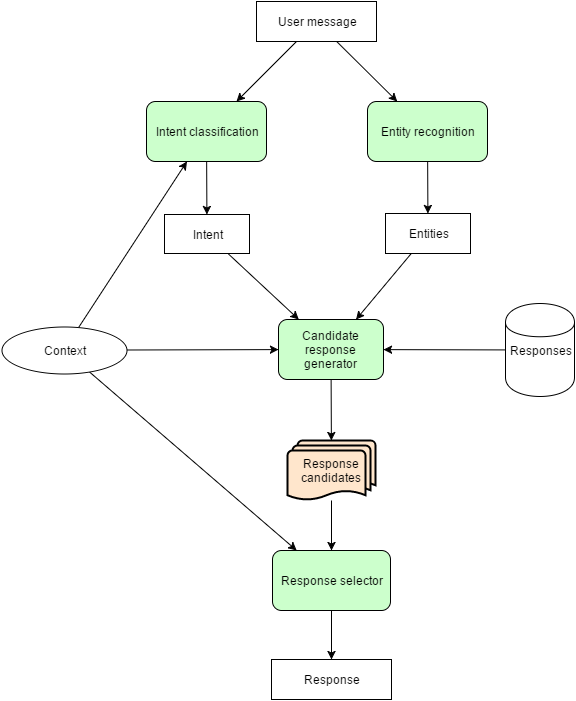
Chatbot conversation framework

Machine Learning Chatbot:

This bot utilizes massive amounts of collected data and intelligent processing to provide responses. You don’t have to be as specific as you might with a rules-based chatbot; it understands natural language, as well as commands. This bot continuously gets smarter as it learns from conversations it has with people.


Platforms

Links


Tuesday, November 25, 2014

New Job, First Day Butterflies

Image Source: http://lentzy.deviantart.com/art/Butterflies-in-my-stomach-53534780

Today was my first day on my new job.  And can I tell you something? There are butterflies in my stomach. I've had them flitting around there all last week, and they are still there today. They are the same butterflies I felt "as a kid", before every swim practice or meet, before a piano recital, or even today, before talking in front of a large audience.

A wise mentor, Amber Rae, once wrote, "Go where there is fear. Growth and freedom lie on the other side."

New job. New team. New tools and processes. New experience.  There is a little fear there, but yes, excitement, too.  And I can see the freedom, and growth beyond. 

Today, I spent time trying to figure out just exactly what my new job is. It's complicated by the fact that I'm the only remote member of my team. I work at a remote office. All the other team members are at corporate headquarters, 340 miles away.  (In the same situation? Here's some recommended reading: Scott Hanselman's Ways to Make Remote Working Work).

It's further complicated by the fact that there really isn't a formal orientation or "onboarding" process (I'm fixing that, by the way, building one as I go -- so I can hand it off to the next "new hire" who comes after me).  My new boss told me, "Drink from the fire hose.  Just listen and learn as much as possible the first 30 days. There's plenty of time to make an impact later. For now, get a lay of the land, work to understand how things get done. Get access to various systems. Get a sense of which meetings are important to be in, which ones are optional or should be skipped entirely. Call me when you need me."

 A colleague outside my department, who works at the same location, just hired some one new.  She commiserated with me, and admitted there is no real orientation process in her department either.  "The best thing to do is to make a list of names and just meet with people individually, to learn what they do and get their backgrounds."

So that's what I've lined up for my next next CHQ visit:  a series of 1:1 interviews with various members of the team, as well as the groups we support.  

While I plan to keep the "flow" informal, I have a list of questions that I hope to weave into the interview. I built the list after reading +Dan Forbes' "33 Questions for Analyzing Your Business" Blog post

1.) What is your role/job description? What do you do?  What did you do before joining this team?  What excites you?  What do you like about this job?
2.) From your view, what is my role? How will we interact day-to-day?
3.) What is our mission? Who are our "customers"? How well do they think we do our job? Do we have a system to measure our customer's satisfaction?
4.) How is our performance / productivity measured (as a team? Individually)? What does success look like? 
5.) What systems or tools do you use?  Do I need them?  How do I request access to them?
6.) How is our business changing?  What was this team / mission / process like 2-3 years ago vs. today?  How do you think it will look 1-2 years out?
7.) What are you working on right now?  What does your project board or product / service roadmap look like (for the systems you touch) in 3-months, 6-months, 1-year, 2-years?
8.) What are you worried or anxious about? What keeps you awake at night?  What help do you need to fix it?

What would you add to that list?

PS - I shared this same post over in the Google+ Leadership: Lead With Giants community. It's one of my favorite communities on Google+ (540 members, all leadership-minded, readily sharing their wisdom and advice).  They are an excellent support group, and provided some very good feedback on this topic. If you have a Google+ account and would like to be part of this community, check out the link above!

Saturday, December 3, 2011

Configure - Price - Quote (CPQ) Solutions


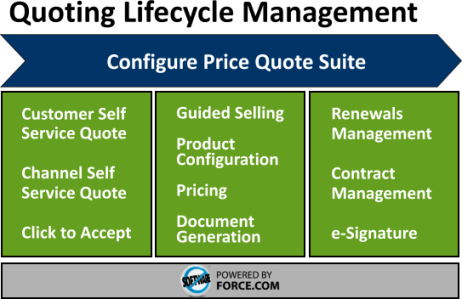
Image: Apttus CPQ Suite


The Sales Cloud application by Salesforce.com provides all of the basic elements for small and medium-sized businesses to generate price books and build sales quotes.  But what about enterprise-sized organizations or even smaller companies with very complex product configurations?  For these businesses, the standard price book, product and quote tools in Salesforce.com may not be sufficient.  These companies must generally turn to a Configure-Price-Quote (CPQ) solution.

What’s In a CPQ Tool?
CPQ solutions vary by vendor, but generally include the following features:

Product Catalog:  In a CPQ tool, Products and/or service offerings are loaded into a product catalog, which stores product information in a structured and consistent way: product name or service name, description, SKU, pricing information and pricing history.  Some CPQ solutions also allow product managers to upload data sheets, pictures and or video clips.  Product catalogs can become very complex tools, allowing organizations to define a nested catalog hierarchy, relationships between products, product code translations for backend billing systems, access / visibility rights, and more.  As a Salesforce.com Administrator, you’ll want to carefully review how the CPQ product catalog integrates with Salesforce.com Products and Pricebooks.  Both are critical areas if you want to take full advantage of Salesforce Opportunity and Quote management features. The best solutions advise users on related products, provide price comparison services, and integrate directly with enterprise resource planning (ERP) systems.

Product Configurator:  You want your sales team selling, not getting mired down in the complex array of currently available product bundles and promotional offers.  Product configurators are tools that the Sales team use to customize bundles of product offerings accurately and quickly.   The best CPQ solutions feature configurators that hide the complexity of your service bundle and product offerings.  Rules management features allow product managers to define product relationships and bundling rules, which ensure deals are built and priced correctly.

Needs Analysis / Guided Selling:  Advanced CPQ solutions feature tools that guide  the ustomer, partner or sales user to see related products / offerings, see automatic discounts or promotions they may be eligible for.  It allows them to compare similar product offerings side by side, or alerts them to current promotions.

Quotes / Proposals Generator:  When you start descending into your CPQ vendor selection process, you’ll find that most CPQ vendors have a stand alone solution – which allows for all product configuration, pricing, proposals, approvals and quote management to be done in their platform – a full SFA solution.  Optionally, they may also provide some integration with the CRM platform of your choosing.  Rich quoting tools will feature extensions, like selectable cover letters, product details, a “first bill” snapshot (for subscription models), terms & conditions, electronic signature integration (DocuSign, eSign, TurboSignature).  They may also include workflow rules to automate the approval process, if needed.

When Do You Need CPQ?
If you answer yes to one or more of these questions, chances are you need a CPQ solution:

- Our current configurations and price rules are scattered across multiple documents – and finding them is slowing your sales team down
- Our Sales team submit orders with invalid configurations or incompatible products; correcting these is costly
- Orders are submitted with incorrect pricing for the selected configuration
- Our Sales team frequently submit orders using expired / discontinued promos or products
- The process of rolling out a new promotion is extremely complex, time-consuming and prone-to-error
- Our product configurations / bundles are so complex, we can’t allow customers to order products over the web

CPQ Vendors (Salesforce.com Certified)
Looking to learn more about CPQ solutions?  The following vendors have CPQ solutions that integrate to some level with Salesforce.com:

- FPX

Other CPQ Vendors

Saturday, July 9, 2011

How To Prepare for Salesforce.com Certifications


I'm helping a new group of Salesforce.com Admins prepare for their upcoming ADM201 Certifications (which they'll be taking at Dreamforce 2011).  While preparing to help THEM prepare, I created this quick list of 14 tips, tricks and advice -- I hope you find it useful!

1.)  Exam Format:  This is a timed, multiple choice exam.  There are 60 questions you must answer within a 90-minute window.  Some questions have one answer, some have multiple correct answers (and you must select all of them correctly).  The advantage of a multiple choice format is that all of the information is in front of you.  The disadvantage is that additional information is also given to you, designed to confuse you.  Some people excel at this format and never have to study.  I’m not one of those people.   I need to study hard, write down the information, and review / recall it often.

2.)  Exam Environment:  Salesforce certification exams are taken on a computer and monitored by a proxy.  The exam software will present you with one question at a time.  You must answer it or skip it, and then move on to the next question.  At the end, the software gives you a chance to review each question and verify or change your answer.  The exam is pass/fail: you need to score a 67% or higher to pass (hey, for most exams we took in college, that’s an F, so how hard can it be, right?).  Exam results are calculated immediately: you will know if you passed or failed before leaving the exam area.

3.)  Scope of the Exam matches the Scope of Salesforce.com:  The exam covers the full breadth of functionality in Salesforce.com.  This might be challenging for admins who are only focused on one aspect of Salesforce.com for their companies (i.e., a new admin who is only using the Sales App for sales force automation features).  Salesforce Administration training and certification covers the full gambit of Salesforce Apps: Marketing, Sales, and Customer Support.  You will need to learn (or refresh) on all of the applications in Salesforce, as well as features that might not be often touched (user / profile / role configurations, security configurations, etc.  I wasn’t prepared for questions about configuring international monetary settings or changing the default languages, because in the company I worked at didn't use these features (and I hadn't attended the training, I just opted for the test).  I passed, but I wouldn't be surprised if I just barely squeaked out a 68% (Salesforce doesn't share the test results, so I'll never know how well or poorly I did on that first exam).  Since then, I have been much more careful in my exam preparation. My advice here is to make sure you’re focusing on the full functionality of Salesforce.com, not just the functionality that you're making use of at your current company.

4.)  Preparing for the Exam: Don’t wait to the last minute.  This is not the type of exam you can cram for the day before (unless you’re one of those people mentioned above, who can breeze through multiple choice formats with no problem).  Start preparing weeks before you schedule the test.  Dedicate small increments of study time every day.  Use the last few nights prior to the exam to review all of the information you have collected / prepared.

5.)  Get a Study Partner:  If you can, find yourself a study partner.  Study buddies and study groups were great in college, they're great when prepping for the Salesforce.com Certification exams.  Don't have anyone you can partner up with at work?  Get involved and connect with folks in your local user group, you’re almost certain to find someone preparing to take the exam, preparing to recertify, or eager to be talked into it!  Plan study sessions, take turns reviewing chapters and writing down your own multiple choice test questions for each other.  Create mock exams for each other and test each other.

6.)  Certification Training:  Salesforce offers 5-day, instructor lead classes which help participates prepare for the Salesforce Certification exams.  There are courses for Admin (ADM201), Advanced Admin (ADM301), Force.com Developer (DEV401), Force.com Advanced Developer (DEV501), and Consultant (CON201).  Courses range from $3,000 (for Salesforce.com Administrator Certification) to $4,000 (for Advanced Admin, and all other certifications).  The courses generally include a voucher to take the exam.  You can register and learn more about these training programs at www.salesforce.com/training.  Confession: I've never taken one of these (I'm too cheap, and I don't personally do well with instructor-led class formats).  Still, I hear great things from the folks in my Admin and Developer network who have taken them.

7.)  Get the Latest Study Guide from Salesforce.com:  At the bottom of the Salesforce Training and Certification page there are descriptions and links to the study guides for each of the current certification offerings.  The study guides include sample questions in the format you'll see during the certification exam.  These are very helpful, make use of them.  Here is a link to the current (Spring’11) Administrator Study Guide.

8.)  Some Great Trips from Bloggers:  Hayata Takeshita (@crmverse) offers some great advice on his blog: Salesforce.com Certification Exam Notes.  Hayata writes, “One obvious piece of advice was to read the questions and answers carefully, especially those with NOT, CANNOT, and EXCEPT in them.  I was provided with two pieces of paper and it helped to answer the questions as TRUE and then transpose them to fit the question format.”  Hayata also suggests a practical study aid: flash cards.  He built his flash cards using the Notepad app on his iPhone.  “Since the exam was mostly about memorization, flashcards were a great tool.  There’s something about writing stuff down that helps improve the learning ability of people.”  You should also check out Hayata's vlog: Home Study for the ADM201 Certification Exam.  It's a short, 8 minute video with some great tips and advice.

9.)  Another Great Blog Resource:  ForceCertified.com is a fantastic resource.  The site was designed by John Coppedge (@johncoppedge), who created the site while preparing for his own Salesforce Administrator Certification exam.  John went on to obtain his developer and consultant certifications, and updated the site to reflect the preparations he did for those exams, as well.  The site also includes a link to a simulated, timed practice exam.  The questions in the ProProfs practice exam are similar (if not slightly harder) than those in the actual certification exam. Take this exam and check your score at the end.  As mentioned previously, you need to score 67% or better on the Salesforce exam.

10.) Write it down:  Both John and Hayata used similar means to prepare for the exam: they read the materials carefully and then wrote the information down.  Hayata created flash cards on his iPhone Note app, John created a website.  If your study practice includes writing stuff down, you will likely retain it better.  If you have a tablet device or smart phone, I recommend checking out www.studyblue.com – free online flashcards that you can study wherever you go!

11.) Harmony of Mind requires Harmony of Body:  Get plenty of rest and eat healthy meals the day before.  Have a great breakfast the day of the exam.  Be positive – you’ve worked hard preparing for this, you can do it!

12.) During the Exam:  Think actively and logically.  Read the questions carefully, don’t rush.  This is a timed exam, so answer all questions that know the answers to first, skip the ones you don't.  Then you can do the mental math ( “Hey, that’s 80%, I should be ok.”) before going back to answer all the questions you weren't certain on.  Do a final review of all questions and answers, if you have time.

13.) After the Exam:  On no, you didn’t pass!  Don’t worry, rumor says that upwards of 40% of people fail their first attempt at the exam.  Don’t despair, you’re still in good company (you’re part of the bold few who have actually made the effort to get certified!).  You are wiser about the questions and format, and better prepared for the NEXT time you take the exam.  It will cost you $100 to re-test, and I recommend doing that sooner (within 1-2 weeks) than later.  Recall (and write down!) as many questions that stumped you as possible.  Then study and prep for the next test.

14.) After the Exam: Congratulations, you passed!  But you can’t stop here.  You need to recertify with each seasonal release of Salesforce.com (approximately 3x per year).  These are necessary because the Force.com platform is constantly evolving.  If you’re not going to continuously maintain your certification (which requires an ongoing financial investment), there’s not much point in taking the first certification.  Shell Black offers some great tips and advice for managing your Salesforce.com Release Exams in his blog: Release Exams.

Good luck -- and be sure to let us know how you did!

###

Thursday, July 7, 2011

Where Have All the Good Admins Gone?


I’ve been watching an interesting trend lately: Salesforce.com Admins are leaving their current companies and joining some of the top CRM consulting companies instead. In the past couple weeks, a half-dozen of the top “Force.com Enthusiasts” that I follow on Twitter, Facebook, and LinkedIn have signed on with companies like Appirio, Mavens Consulting, Accenture and Acumen Solutions.  Some recent examples (most on this list flocking to Appirio):


These aren’t just Salesforce.com Admins either … they’re some of the Top Guns in the Force.com community. Many of them are inaugural members of the Salesforce MVP program, all of them are strong Customer Evangelists for the Force.com Platform.

What’s happening here?

This past month, at Cloudforce Boston, I had a chance to chat with several Salesforce Admins who are on that list. Of the individuals I spoke to, each cited a similar motivation: they’re very passionate about Salesforce.com. They know what great things it is capable of doing and they’ve seen some incredible use-cases and ways other companies are using it. Some expressed a little frustration at their own companies, who were not taking the recommendations and advice of these Force.com Gurus: “I just came to the realization that no matter what I tried to do, I just wasn’t going to win them over. I don’t want to fight that hard to make my company brilliant! I want to work with companies who recognize the benefits of Salesforce – who really want to use it – and then help them get the most out of it.”

I have to confess, I occasionally experience these same frustrations. To me, it’s so clear how a well-developed and widely deployed CRM solution can completely transform a company. I’ve seen that transformation at other (smaller) companies where I’ve deployed Salesforce (and sometimes, competing CRM solutions). Partial CRM deployments are great, full CRM deployments (covering all customer-facing teams) are better, but extending the platform deep into the back office is simply #Awesome.

In a small company, I was able to roll out CRM features across the entire company quite easily: I’d just turn features on. Users were eager to see what else the platform to do, and it was easy to roll-out custom apps and services that met their needs. In a large enterprise company, I do far less development / deployment and far more preaching. I need to constantly evangelize cloud-computing in general, basic principles of CRM, and the value of extending our CRM tool beyond Sales. It’s exhausting and I can sympathize with some of those admins who favored the consulting career path.

Another Salesforce.com Top Gun that I correspond with (whenever our cloud paths cross) has been advising her company to avoid splitting their Salesforce.com org into two instances. In some cases, it might make sense, but in their model, she knows that it doesn’t. She’s the lead Salesforce.com Admin, and is being told “do not question this decision (to split the orgs), do not ask any questions.”

When your company no longer allows you to give them appropriate counsel and advice – no longer allows you to even ask questions – it might be time to seek out blue skies and green pastures.

###

Saturday, June 11, 2011

Liking the New Twitter Feature – Tell Me Who Liked What I Wrote

This past month (5/23/2011), Twitter introduced a new feature: email notifications whenever someone “Favorites” or retweets one of your posts (as long as you “follow” that Twitter user). It’s only been three weeks since the feature was rolled out, but I’m finding it to be a dang useful feature!

Why It’s Useful

My tweets are hodge-podge of information, but generally relate to CRM, Salesforce.com, cloud-computing, agile methodologies, privacy and security. These are my hot buttons, the areas of technology I am most interested in. These are the topics I tweet and blog about. More than likely, the folks who follow me share some of these same interests (otherwise, why follow?).

I get a lot of useful information from the folks I follow on Twitter. I especially like the way Paper.Li delivers all this content to my mailbox, in a newspaper format, twice daily.

Like many Twitter users, I like to reciprocate. I hope that the information I am tweeting is useful to those who follow me. Until this Twitter feature came along, my tweets have been largely a “one way” communication. Occasionally, users would retweet a particular message, and I’d see evidence of that in a my twitter stream. But now, getting an email link with of everything that has been favorited or retweeted gives more direct feedback. It lets me see who liked something I wrote. Those positive feedback loops are important in social tribes. Being able to see how often something you posted was “liked”, marked as a “favorite” or “+1” gives the author a sense of appreciation: someone found this information useful, I should do more like that.


Enabling and Disabling the Feature

When the feature was rolled out, it was set to enable for all users.  You can change those settings easily: when logged into twitter, click the drop-down icon next to your name, settings, Notifications tab, and uncheck the appropriate activity checkboxes.


What do you think of the new feature?  Like it or hate it?  Do you think it might change the way you or others tweet?

###

Friday, June 10, 2011

Simple Productivity Booster: Disabling the Outlook Email Desktop Alert

This past week, Ed Gallagher, our Division VP, brought in a Productivity Expert from the David Allen Company. David Allen is the author of “Ready for Work”, “Making It All Work”, and “Getting Things Done”. Ed had recently attended one of his seminars, and then hired one of the author’s professional consultants for some 1:1 coaching. Ed was so inspired by the program and the benefits he got out of it, that he decided to have all of his Directors, Managers and Supervisors attend the same training.

I have to confess – as finely tuned and productive as I think I am, I learned a thing or two. One of my “instant gratification” favorites from the training was: disabling the Microsoft Outlook email pop-up … read on!

Our trainer was Chris McIntyre (great speaker, great trainer!) and he promised to teach us things about Outlook that we didn’t know. Impossible, I thought!

Microsoft Outlook is my favorite email tool (sacrilege from a Force.com Evangelist, eh?), mostly because it’s the tool used by every company I’ve yet to work at. I use all the features of Outlook and I mean all: email, calendar, contacts, groups, tasks, notes, journals, views, rules and alerts, forms, macros, VB scripts … everything. It’s my nature. I become extremely vested in the productivity apps that I use every day and have to understand every little nuance about them. But there’s a difference between knowing every little feature that a product offers, and understanding when and how to use those features.

One of the tips that Chris recommended early in the session: disable the email pop-up alert (which is enabled by default) triggered when a new email enters your inbox. Chris explained, “It’s a productivity killer, especially if you get a lot of email. And I’ve been looking at the way you all work the past few days … you guys get A LOT of email.”

He’s right. On a daily basis, there are probably 100+ emails that move through my inbox. “Think about it,” Chris continued. “There you are, working on that really important report for your boss. You’re in the zone, writing up the document and – tap, tap, tap. It’s like someone tapping on your shoulder or tugging at your shirt sleeve: the email alert. And it stays there for a while, saying, ‘Hey, look at me … it won’t take long. Just look. LOOK! I’m titled REALLY IMPORANT.’”


And every email that comes in to the inbox does the same thing. Tap, tap, tap.

Of course, I knew how to disable the feature already – I just always thought keeping it on was the proper thing. Afterall, these are emails! They are COMMUNICATIONS! THEY ARE IMPORTANT!!!

But they’re not, really. They are distractions. They steer my attention away from my primary focus. They may indeed by important, but they can wait. Because whatever I’m working on right now is MORE important. If someone wants to get a hold of me urgently, they can call.

So I disabled the email pop-ups (In Outlook 2007, right click on the Outlook icon in your Systray, and uncheck “Show New Mail Desktop Alert”; same process for Outlook 2010, but the displayed menu options are labeled differently).


Today was my first full run without the pop-up alerts. Wow … what a difference it made. While writing up a detailed enhancement request, I was amazed at how much better it felt to get through that whole hour, without a single email interrupt. It was like working in the office on a quite Sunday afternoon. Sometimes, we allow ourselves to be distracted by every little thing; we forget the importance and ease by which we can tune out the world, and how much our brains really need that.

More tricks on the way, as I review my class notes and embrace some of the other lessons learned.

###

Sunday, May 1, 2011

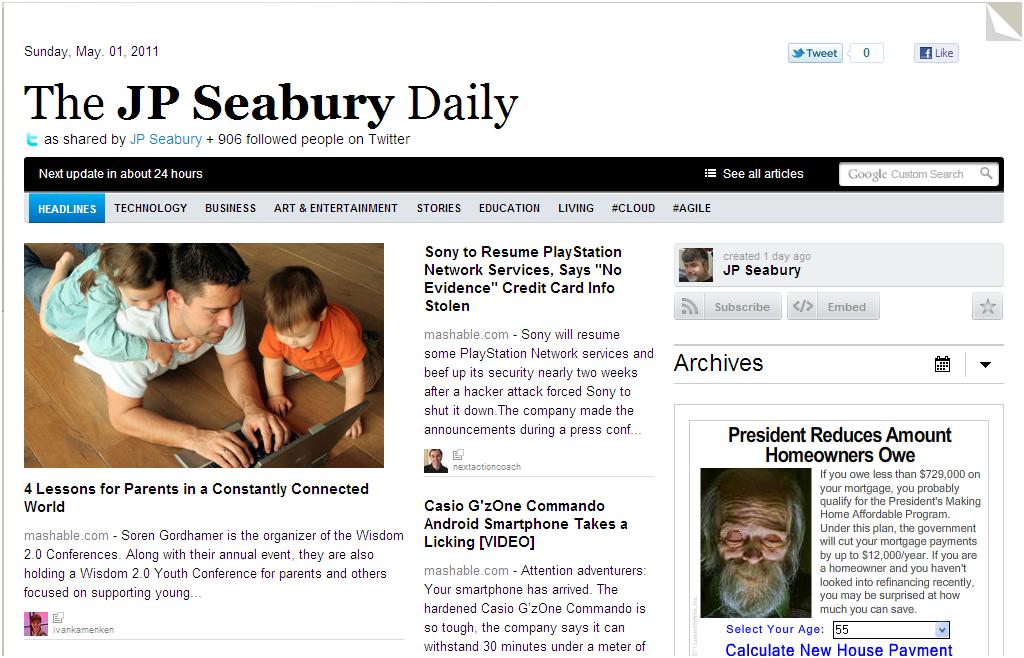
My Favorite Daily News Source: Twitter (via Paper.li)

If you are an avid tweeter, then I highly recommend you create your own Paper.li subscription. It’s free, and it’s a remarkable tool for delivering focused content, directly to your email inbox, in a daily electronic newspaper format.

Whenever I’m online, either at home or at work, I’ll invariably have Hootsuite up. It scrolls a constant stream of tweeters and search topics that are of interest to me: Cloud Computing, Salesforce, Comcast, Robotics, Project Management, Process Improvement. Hootsuite allows me to stay connected with peers and my “social community”, and find new connections with people who share my interests. But even though I’m somewhat selective in who I follow on Twitter, it’s still an extremely high-volume of content. It’s very difficult to keep up with that stream.


Enter Paper.li

Paper.li summarizes all of the content (links, articles, photos, videos) that were shared by the people you follow, and summarizes them into a daily newspaper format. Confession: it felt somewhat pompous to create a newspaper around my own name. I had to get past that, and remind myself that the daily newspaper content isn’t mine – it is stuff that was shared by all the people I follow on Twitter. It’s all packaged up in a newspaper format, delivered to my email inbox daily. The format is much easier to read than scrolling through a twitter stream at the end of the day. This daily feed has become one of my favorite ways to take in news and information.

Paper.li allows you to set the frequency of your newspaper feeds, including a Daily Edition (default), Morning & Evening editions, and a Weekly edition. You can even control the preferred delivery hour. Don’t you wish you had that flexibility with your regular newspaper?.

Paper.li inserts some advertisements throughout the newsletter. The ads are not overbearing or distracting; I’m able to ignore them as easily as I ignore advertisements in a traditional newspaper or magazine.


The result is a daily newspaper that has a refreshing mix of personal interest content mixed in with industry and work-related content. I truly love it!

Creating your own daily Paper.li newspaper is easy:

1.) Navigate your web browser to http://paper.li
2.) Click “Create A Paper” in the top right hand corner of the page
3.) Follow the prompts to create a paper based on:

… your Twitter account: the newspaper will consist of articles shared in the past 24-hours by yourself and the people you follow on Twitter.

… a hash tag (i.e., #salesforce): the newspaper will contain articles shared in the past 24-hours by all Twitter users, who associated that hash tag with the article

… a Twitter @list: select any Twitter list, your own or that of another Twitter user, and get a daily newsfeed of articles shared by those users

Note: If you have taken an approach of simply following EVERYONE who follows you on Twitter, you may want to prune your Following List. The newsfeed is much more relevant if it includes articles promoted by people who specifically share your interests.

Check it out, and let me know if it makes a difference on how you read and manage your Twitter following practices.

Friday, January 28, 2011

From Chatter Apathy to Chatter Fan in 30 Days

Meet Joe Onisick, a self-proclaimed “IT professional specializing in data center technologies with a focus on virtualization and private cloud architecture.” (I haven’t had the heart to tell Joe that there is no such thing as a private cloud – that it’s a myth, like unicorns and leprechauns – but perhaps we’ll broach that twitter conversation on a later date :-)

I jumped into a conversation with Joe when he spoke disparagingly of Chatter:


So here we have a well-educated, intelligent fellow, who finds real value in “public social media”. From reading his Twitter stream, I see that Joe expertly wields Twitter to find other business professionals, networks with them to get answers and solve problems. So how is it that he couldn’t see a similar benefit with Chatter?

Could it be that the Chatter deployment at his company did not have appropriate C-level executive sponsorship? Securing your C-level executive sponsor is critical in any organization-wide application. Someone “at the top” has to recognize that this corporate social media stuff has value, convince their peers that it will be helpful to the company, and provide the oversight to ensure that it is rolled out properly.

Perhaps there had been no training for the user community at Joe’s company. Let’s be honest – a good number of our friends, relatives and work colleagues simply don’t understand the power and impact of social media – or even what it’s good for. A corporate executive, whom I get to work with from time to time, refers to Facebook as “Wastebook”. He perceives it as a tool for idle minds and wants no part of it in the workplace. An organization cannot simply turn on a tool like Chatter and hope that employees will “get it”. Training, monitoring, and re-training must be part of your Chatter roll-out strategy.

Perhaps the deployment did not have appropriate attention by community moderators. Social media is only useful when there is wide participation. In public social media tools, like Facebook, LinkedIn and Twitter, there is an enormous community of active participants. But when you close the tool to a smaller community, it very often requires a moderator to monitor the micro-blogging stream, create and steer conversations to the appropriate discussion groups, and nurture the community until it is able to thrive on its own. Many corporate social media experiments fail, simply because there is no one there to lead the conversation and get everyone out of their SocMed shells.

I made a note to check back with Joe one month later. I wanted to see if there had been any change to his position on corporate social media. There had been:


From Chatter Apathy to Chatter Fan in 30 Days. Go get him, Robin Daniels, there’s a successful user story in there somewhere!

Saturday, January 8, 2011

Salesforce.com Acquires Dimdim - Why Is That Good?

This past week, Salesforce.com acquired Dimdim, a browser-based web conferencing service provider. Dimdim is a very useful app and I’ve used it to conduct webinars, User Group meetings, and training sessions for remote employees. As web conferencing goes, Dimdim included all of the basic functionality: ability to schedule a web conference, track meeting registrations, automatically send email reminders to meeting registrants … even the ability to record the web conference for later playback.

After the event, the web conferencing organizer would receive an email link, which he could immediately share with anyone – so they could view the recorded session and play it back at their leisure. Organizers also recedived an embedded HTML link, which they could paste into their blog or website, making the content of the meeting available to a general audience. Beyond web conferencing, Dimdim had other useful features, like whiteboard collaboration, the ability to share and store documents, phone conferencing, and webcam sharing.

I used Dimdim for a good number of Salesforce.com consulting projects that I was doing for Non-Profit Organizations. These organizations were attracted to Dimdim because it was the only free web conferencing solution available. The free version only supported 20 attendees, but that was perfect for their needs. The Pro version, which allowed a greater number of participants and more functionality, was only $25 / month. Very compelling, compared to other web conference vendors, which were in the $40 - $60 price range.

It’s clear that Saleforce.com is acquiring Dimdim for its technology, not its customer base. When giving me the heads-up about the acquisition, my Salesforce.com Account Executive was careful to mention that Salesforce currently has “no plans to go into the web conferencing market.” Shortly after that, I got an email on my free Dimdim user account confirming the same: my Dimdim account will remain active until March 15th, and after that I won’t be able to use it.

That doesn’t mean Dimdim will go away completely. Afterall, Dimdim is based on open source code, and an open source version of the code will be posted to SourceForge.net. However, neither Salesforce.com nor Dimdim will be contributing to the open source project going forward. Source: Brown, Rodney (2011, January 7). Mass High Tech: Dimdim sells to Salesforce.com for $31M.

Why is this good for Dimdim? In the press release, Dimdim CEO DD Ganguly summed it up simply enough, “From our start, Dimdim has focused on enabling real-time collaboration in the cloud, with no software. Salesforce.com gives us the opportunity to apply our expertise and align our vision of real-time, social enterprise software in the cloud – at a scale that wouldn’t have been otherwise possible.”

Why is this good for Salesforce.com? Good development talent is hard to acquire, and in just 3 years, Dimdim has done some very interesting, innovative stuff in the web conferencing space. Salesforce plans to retain the Dimdim engineering team, most of which are located in India. Although the standalone web conferencing service is terminating, the engineering team will focus on integrating “Dimdim’s technology with Chatter as quickly as possible.” Source: Henschen, Doug (2011, January 7). InformationWeek: Salesforce.com Acquistion Feeds Chatter .

Why is this good for Salesforce.com Users? Plan on seeing some new features in the Salesforce.com Collaboration Cloud service very soon: instant messaging (and being able to log those communications to a contact / lead / case), screen sharing (how handy will that be for your customer service team?), whiteboard collaboration sessions that can be recorded and stored in Content or Chatter Groups, training webinars (also recorded and stored for replay), and more. Great stuff coming!

Why is this good for Dimdim Users? Well, truth be told, it ain’t. There’s not one good thing about this for Dimdim users, and I’m sorry to see my Dimdim web conferencing user account go away. Individuals who used Dimdim for web-conferencing will look toward other web-conferencing solutions (Yugma/Skype, for no-low cost; GoToMeeting, WebEx, Live Meeting, iLinc or others for subscription services)

What about you? What are you looking forward to with the latest acquisition by Salesforce.com?