"If I have seen further it is only by standing on the shoulders of giants." -Isaac Newton
Updated: I found an error in my earlier posting: the value of the Alexa ranking was reversed. I mistakenly thought that a high Alexa ranking was favored over a lower ranking. I corrected the ordering based on the Alexa scores (sorry, Mike - now I'll have to buy YOU a beer at Dreamforce!).
Mark Fidelman (EVP Sales @ MindTouch) recently wrote an article for the Cloud Ave blog titled, "The Most Influential Technical Communication Bloggers". I recognized a few names, added several to my Google Reader feed, but most were unfamiliar to me. Blogs are a primary information source for me, and I read a lot of them each week. When I first started working with Salesforce, I grew up on a steady diet of Gokubi.com, CRM FYI, X2 On-Demand, and Perspectives on Salesforce. These were the giants on whose shoulders I stood.
I compiled a list of Salesforce.com Bloggers, and then because I was curious, ranked them in a similar manner as Fidelman's Most Influential Blogger article: a weighted formula across a range of metrics, including Alexa, Klout Influence, Google Page Rank, Technocrati Authority, and Twitter Followers. I also added a 6th category: # Blog Posts YTD. Each category was given an equal weight, scaled on a rank of 1-10. With 6 categories, a blog could have a ranking between 6-60 – the most influential bloggers scoring at the top side of that range.
I started with a simple Google search on “Salesforce Blogs”, recording the URL for each. I arbitrarily stopped after the first six pages returned by the search engine. If the authors of various blogs included links to other Salesforce blogs (and many did), I added those to my research list, as well. In the end, I found 47 different Salesforce.com blogs. To be included in the ranking, a blogger needed to focus their posts on Salesforce.com, with at least 6 Salesforce-related blogs posted YTD.
For blogs that were co-authored, I used the Twitter account associated with the “Retweet” button on that blog. For instance, the Cloud Blog is co-authored by various Salesforce.com executives: Marc Benioff, Parker Harris, Peter Coffee, John Taschek, and Steve Gilmor. The “retweet” button on this blog uses the Twitter alias @salesforce, so that is what I used to evaluate the Klout influence and Twitter following of that blog.
Top 10 Most Influential Salesforce.com Tech Bloggers Here are the Top 10 Most Influential Salesforce.com Bloggers (NOTE: There were ties for 4th, 9th and 10th place):
Here is the detail break-out for all of the blogs that made the ranking qualifications:
Honorable Mentions There were 30 other blogs, but many were filtered from the rankings process due to the infrequency of their posts (the arbitrary cut-off was 6 posts YTD, averaging 1 per month). Of these blogs, Honorable Mentions go to:
The Force Monkey blog has a new look tonight. While I was playing with the new Blogger Template Designer, I updated the background, the font templates, and changed the blog sub-title. The old "Never understimate the power of the Force!" sub-title is gone, replaced with the new "I am Force Monkey, hear me Chatter!" All credits go to Gary Breavington (@gbreavin on Twitter), and here's the background story ...
Earlier today, I received an email from a fellow Salesforce.com User Group member,
"Hi JP, I was just on a partner webinar with Salesforce and they are reiterating the branding rules in their [Salesforce Partner Terms & Conditions Agreement]. One of the rules is no "force" in a company or product name. I don't know if this is applicable if you are not a partner, but wanted to mention it to the key Force Monkey!"
I understand the position entirely. As Salesforce.com rebrands it's identity around the Force.com name, it has to be protective of it. Customers might presume that any other company that uses "Force" in their own product or company is endorsed or more directly affiliated with Salesforce.com. At the same time, I'm a rebel at heart!
Here's the twitter conversation that spontaneously led to the sub-title change on this blog:
So there you go, the source and inspiration for the new blog sub-title. Thanks, @gbreavin, @IdaApps and @DarthGarry for the mid-day laugh. Ha!
I should explain where Force Monkey comes from, I get asked about it often. The origin actually predates Salesforce's rebranding on the Force.com name.
About 4-5 years back, I worked as a Technical Support Engineer for a small, start-up company. We had just brought in a consulting firm to help us select a CRM vendor, and settled on Salesforce.com. The consulting partner gave a price tag for helping us with the initial deployment and data migration, which weighed in somewhere near half my annual salary -- and was a four month project. We were actually at risk of not going forward with the CRM deployment, because the company wasn't prepared to make that investment.
I told my boss, "The consultants have been great in helping us narrow down a CRM vendor, but I think I can manage the roll-out faster. Let me take a crack at it."
He did. I was surprised at the speed and efficiency with which we could customize the tool. I rolled out the company's first Salesforce.com deployment in just four weeks. After the initial turn-up, I scheduled a two week window for doing rapid changes / updates to the package, based on user needs and requests.
One of the Resident Engineers came in to the office that I shared with another colleague and asked, "What are you force monkies doing in here? This is crazy fast, I just asked for that feature this morning!"
The name stuck, and Force Monkey found it's way to my "unofficial" job title. I've since done several consulting engagements and freelance projects as Force Monkey and Force Monkey Labs, although I've never incorporated as such. Now that it's been expressly forbidden, I just might have to!
Full Disclosure: I am currently employed by Comcast. As such, my employer would potentially be impacted by the Google Fiber for Communities project. Depending on where Google deploys their proposed Open Access Network, Comcast might lose 50K - 500K subscribers. That said, I'm also a believer in laissez-faire economics, Adam Smith's "invisible hand", and welcome the idea of free market competition. I enjoy the open rivalry between Comast, Dish and Verizon (in my local area). Competition fosters innovation, reduces consumer cost, and drives companies to optimal performance. Competition is good for consumers and it's good for companies, too. Adding Google to the list of Comcast competitors would be interesting, not worrisome. Still ... I've seen and participated in a number of failed Google experiments, including the Nexus One. My own frustration with the Nexus One is the true reason for this blog, not worries about competition between Google and Comcast. Oh, and lest I forget, the views and opinions expressed in this blog are my own and do not reflect those of my employer.
When you make $23 Billion a year as a company, you can try all kinds of whacky "experiments", see if they work, and if they don't, just pull the plug. Think Google.
Google broke into the mobile industry last year by offering the Nexus One smartphone. Although the device was made in a close partnership with HTC (a Taiwan-based hardware vendor), Google sold the device exclusively through its website.
The Nexus One was designed to showcase the Android software, which was also developed by Google. Unfortunately, Google soon found that making a great mobile phone isn't enough -- you also have to support it. Soon after the phone went on sale, buyers started to complain on Google's support forums: they weren't getting prompt assistance when they had problems with their phones. There were also angry at the $550 early termination fee.
This week, Google announced that they are shutting down the Nexus One project. The phone will no longer be sold through the company's e-commerce site. Google will provide "support" for current owners, and will allow some carriers to continue distributing / supporting the phones -- but Google is effectively getting out of the mobile phone business.
Being a mobile phone carrier is hard. Maintaining a call center staff to deal with all your inbound customer complaints, technical issues, and service needs is difficult. But you know what? So is building, maintaining and supporting a broadband network infrastructure.
What happens after Google builds their ultra-high speed broadband network? Will they hire marketing personnel, to foster new marketing campaigns that compete and win market share from local broadband competitors? Will they hire Sales personnel to find new customers, win them over from competitors, etc. Will Google hire operations personnel, to provision the systems, hire technicians and engineers to maintain the fiber plant? Will they staff a call center to respond to customer issues, open trouble tickets, and dispatch service technicians? Will they engage with local government agencies / obtain permits (read "pay local government fees") to expand their network into adjacent communities? Or will they bail on the experiment after a few months?
I hope all those communities clamouring for the Google Fiber for Communities project are paying attention to Google's entry and subseuqent pull-out from the mobile phone market. I hope they look at other Google experiments (and the current state of those experiments), like Google Answer, Google Buzz, Google Catalogs, Google Directory, GOOG-411, Google Scholar, Google Search Appliance for Enterprise, Google SOAP Search API, Goog SMS, Friend Connect, Knol, Orkut, Google Wave, Web Accelerator, Google WiFi, Google Video ... the list goes on.
Don't get me wrong -- I like Google. I use their Search engine product every day (it's the default home screen for my home computer, and would be for my Work computer, if IT didn't lock down the ability to change the browser home page). I also use other Google products (Gmail, Picasa, Blogger, Google Voice, YouTube) routinely. But I know these other products don't make Google much money. At any time, they may suffer the same fate as the Nexus One (or all those other Google experiments, cited above), or be moved to a premium / subscription model (in which case I would likely discontinue using them).
Google is a Search Engine company. They make their money by reading, indexing, and storing all the data they can harvest from the internet, and presenting it to consumers through their search engine and/or search advertising product. Their entire business model is centered around making information public.
Frankly, I'm a little uncomfortable with the idea of my data, even encrypted, flowing through Google's fiber network. Especially after it was discovered that Google Street View cars had been sniffing Wi-Fi data. Even in the aftermath, I don't believe Google thought the idea of sniffing WiFi packets (i.e., finding data, indexing it and storing it) was a bad thing.
Google wasn't a particularly good mobile phone retailer, I have doubts that they'll be any better at maintaining and supporting a fiber broadband network.
She writes, "Having been a salesforce.com Administrator for over 5 years with a detour to MS CRM 3.0 in the middle, I have a hard time believing MS will be able to challenge salesforce.com. The inherent difference that I see is Microsoft is still too concerned with maintaining control of the CRM through IT Departments and IT consultants. This slows innovation, internal busines change, and most strikingly, empowerment of the business Users.
"The reason so many business users/departments now pay for their salesforce.com licenses and the support staff is that they want to quickly respond to changing business climate. They do not want to go through 2-4 weeks of CABs, written requests, funding allocation and final review while waiting to have the dropdown choices in one field change.
"IT Departments that are focused on quickly managed innovation, not just control, do not find their business users purchasing SaaS programs like salesforce.com outside of IT. The innovative IT Department welcomes the SaaS programs and seeks full integration between all the information systems to materialize the competitive advantage CRM offers."
Spot on.
I used to be a Microsoft Dynamics CRM User myself, although that was way back in version 1.2 days, before the rebranding to "Microsoft Dynamics". Back then, the product was simply horrible.
Although I'm a Salesforce.com Evangelist (some call me "fanboy", but I'm too old for that moniker), I watch the evolution of Microsoft CRM closely. Why?
First, because I believe competition is good. It helps drive innovation. Salesforce.com has emerged as the clear front-runner on the multi-tenant, highly-reliable, highly available CRM platform. They've pushed beyond that with their Force.com development platform. As high as they are in the cloud, I want them always watching with one eye below, to see who's coming up to unseat them.
Secondly, I generally like Microsoft products. There, I said it. I've used OpenOffice, Google Docs, and Zoho Docs, but business needs always brought me back to Microsoft Office. The web-based apps just don't meet the breadth and depth of functionality in Office. When I need to make that professionally looking Word document (formatted just so, quickly and painlessly), or crunch serious numbers, formulas and data, or build a slide deck that wows and amazes, I load up Microsoft Office. I also use Outlook, Visio, Project and SharePoint heavily. They are critical tools in my daily work.
So truth be told ... I want Microsoft CRM to be successful. I believe they have the best chance to provide that clean, elegant, seamless integration between my CRM tool and all of my daily productivity tools.
There are signs that Microsoft "gets it", and wants to realize that vision, too. At Microsoft's Worldwide Partners conference this week, Business Division President Stephen Elop described a suite of interacting Microsoft programs, all accessible through the cloud. Marketing, Manufacturing, Sales, Procurement, Service, Accounting, Distribution, Human Resources, Collaboration, Service Delivery all in one tightly integrated cloud-based tool set? Sign me up!
I don't anticipate Microsoft realizing that vision any time soon, but they need two things to win me back to doing a serious evaluation of their CRM offering:
1.) The Microsoft version of Salesforce.com's "IdeaExchange". Microsoft is very much out of touch with the needs and interests of it's user community. The IdeaExchange has proven to be the ideal tool for crowd-sourcing new features and functionality, and influencing the Salesforce Roadmap. Every company should have one of these, and Microsoft needs it desperately.
2.) Tight integration with the other Microsoft produtivity products I use every day: Outlook, Word, Excel, PowerPoint, Project, Visio and SharePoint. I want the functionality of these products in the cloud, fully accessible through and tightly integrated with my CRM. Without hiring an army of IT consultants, Only then will I be free of my desktop, and able to access all of my work needs from any computer in the world. The company that implements this seamlessly (or comes closest to that) will capture my CRM interest.
Salesforce.com is my favorite CRM tool. Microsoft Office is my favorite productivity tool. Having a solid integration between the two applications is a no-brainer, but I've always been frustrated by current integration, particularly when it comes to synchronizing Salesforce / Outlook contacts, emails and calendar events.
This blog post takes a look at the current state of Salesforce / Outlook integration, gives Salesforce.com administrators some alternative options, and a glimpse of what's to come.
Salesforce.com / Outlook Integration Today
Today, Salesforce.com publishes a free Outlook plug-in called “Salesforce Connect for Microsoft Outlook”. akaCRM has written an excellent blog titled, "Outlook Integration with Salesforce.com". It's a great read, especially if you're looking to deploy this tool for your own Salesforce.com organization. The article describes the benefits of integrating Salesforce and Outlook, explains what data synchronization can be performed, and includes a high-level overview for installing the plug-in.
As a consultant, I've worked with many companies on different systems (Dell, HP, Sony, Toshiba), various Microsoft OS (XP, Vista, Windows 7) and different versions of Microsoft Outlook (2003, 2007, 2010). While some users have a trouble-free experience, most admin teams I've worked with get hammered with support calls related to the plug-in. Problems include:
1.) The Outlook plug-in is "mysteriously" disabled at start-up. Users can't see the Salesforce icons/menu options in Outlook, and need to either enable the plug-in (in the best of cases) or remove/re-install the plug-in (in the worst of cases).
2.) After intsalling the plug-in, Outlook has a propensity of crashing, prompting the user to disable the plug-in whenever it does so
3.) Outlook slows to a crawl (possibly during data sync operations, though users complain that this occurs more frequently than their data sync operations are set for)
4.) No plug-in support for Windows 7 (64 bit)
Even when the Salesforce Connect for Microsoft Outlook plug-in works flawlessly, it's far too cumbersome for end-users. There are too many mouse clicks required to associate an outlook email with its corresponding contact / lead / opportunity / case / custom-object record in Salesforce. When first installing the plug-in, users frequently stumble (despite training and coaching), and end up loading the CRM with duplicate contacts / accounts / events. This frustrating user experience leads to low user adoption / CRM abandonment.
For Salesforce Administrators, it's no picnic either. Setup and configuration for the Salesforce Connect for Outlook plug-in is decentralized: each user downloads, installs and configures their Outlook plug-ins individually. Whlie it's possible to push the plug-in to all users, it's no simple task for most SFDC Administrators. Consequently, Admins spend hours responding to user questions, helping non-technical, SFDC users install the plug-in, sync their data, and then dealing with setup / plug-in technical issues. These technical support woes take Salesforce Adminstrators away form their core mission, which is to extend the functionality of Salesforce within the company and help the business realize greater value from their Salesforce.com investment.
Salesforce.com Has a Fix Coming Soon! (Insert Safe Harbor Statement)
The current Salesforce / Outlook integration stinks. There, I said it. And lest you think it's just me, comb the Salesforce.com Community Answers site and you'll find plenty of frustrated users reporting the same thing.
Fortunately, Salesforce.com is working on a fix! At last year's Dreamforce event, Blake Markham, Sr. Product Manager / Email Clients for Salesforce.com, gave a terrific demo on the upcoming Salesforce CRM for Outlook app. The product is still in beta, and while it doesn't have all features of the current Connect plug-in, the sync and seamless integration features demo’d were a vast improvement over the current solution. Email and calendar sync are seamless and automatic, lead/contact records can be created with a single click, and the new tool gives SFDC admins centralized control of the deployment and configuration for their users.
In the November 2009 demo, Blake indicated that the new Salesforce CRM for Outlook tool was being piloted with a few select customers, and that he hoped to have it generally available this summer (Safe Harbor statement). Unfortunately, the Summer'10 release has come and gone, and the new app was not included. The tool will most likely be deferred until the Winter’11 release. In the meanwhile, if you’re willing to be a “beta tester”, contact your Salesforce.com Account Manager, and see if they can help get you into the pilot.
I suspect the Salesforce.com Email Clients Development Team is understaffed. It must be! What else would contribute to both the delayed launch of the Salesforce CRM Outlook tool, the lack of support for Outlook 2010 and Windows 7 (64-bit), and the many unresolved bugs in the current Connect for Outlook plug-in?
Unfortunately, the current trademark war between Microsoft and Salesforce.com isn't likely to change that staffing problem soon. Salesforce Customers and Users are caught in the crossfire, and the only winners will be the lawyers on both sides.
3rd Party Vendors Put a Silver Lining on this Grey Cloud Integration
There are a several 3rd Party Vendors who can provide some immediate relief to your Salesforce / Outlook integration problems. Here are a few worth taking a closer look at:
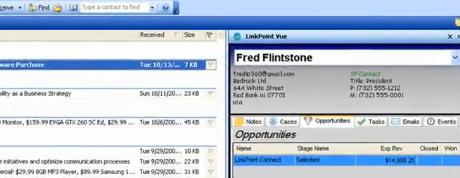
Image Credit: Screenshot from a LinkPoint Vue Demo
Description: LinkPoint Vue is a mash-up between Microsoft Outlook and Salesforce.com. The tool is built directly into Microsoft Outlook and supports Outlook 2003, 2007 and 2010. The mash-up creates a viewing window in Outlook. As you look at email from your leads or contacts, the mash-up searches for the matching email address in Salesforce.com, and pulls up the appropriate Lead or Contact record, as well as related Opportunities, Cases, Events, Tasks -- even custom objects -- related to that email originator's account. Bean-counters will like the one-time cost model (no monthly / annual subscription fees!)
Features: - Ability to create Salesforce.com Contact and/or Lead records via drag-and-drop. - Users can view Salesforce data inside Outlook without having to alt-tab / search in Salesforce - Click on an email record in Outlook, and view all all contact history / activity related to that Lead/Contact in SFDC. - Create / Update / View a Salesforce Account, Contact, Lead, Opportunity, or Case record from within Outlook with a single mouse-click (much easier than the Connect plug-in!) - Get maps / directions to a contacts address with a single mouse-click (nice Google/MapQuest mash-up integration here!)
What’s Missing: - Outlook / Salesforce Calendar integration. Users want the ability to create their appointments in Outlook, and have them seamlessly updated as calendar events in Salesforce (or vice versa). Add this feature, and the tool gets 5 Force Monkey stars! - Centralized Administration Tools to setup, configure, and/or maintain the tool.
App:SalesDesktop 3.0 Publisher:InvisibleCRM Price: $18/user/month (discounts available for Non-Profits / NGOs) Posted Date: 9/30/2006 SFDC Editions: Professional, Enterprise, Unlimited, Developer Reviews:5 reviews, rated 4.6 of 5 stars Demo:click here
Description: SalesDesktop 3.0 has been around for long while, steadily adding functionality and enhancements to the application for the past 3+ years. This application is an Outlook plug-in, allowing Sales Reps to seamlessly synchronize their Outlook and Salesforce data, including calendar and task synchronization.
Features: - From within Outlook, create / update / view Salesforce.com Leads, Contacts, Accounts, Opportunties) once, and the tool will automatically synchronize future inbound/outbound email activities. - Synchronize Outlook / Salesforce.com data to your mobile device. - One-click capture of lead / contact info - Data synchronization occurs automatically, seamlessly, in the background - All Salesforce CRM objects are viewable as folders in Outlook
What’s Missing: - No support for Outlook 2007, 2010. - Client-side App means you will inherit some of the same issues you have today with the Salesforce Connect plug-in: decentralized environment, users specify their own filtering rules, etc.
App:CureCRM Email Publisher: CureCRM Price: $4.95 / user / month (Limited Free version available, syncs outbound emails only) Posted Date: 8/13/2009 SFDC Editions: Group, Professional, Enterprise, Unlimited, Force.com, Developer Reviews:24 reviews, rated 4.9 of 5 stars Demo:click here
Description: What most impressed me about the CureCRM reviews were the many comments CureCRM customers gave regarding CureCRM technical support. These guys really stand behind their customers, going above and beyond to deliver outstanding product support!
As with other email integration tools, the application allows users to create Salesforce.com Contact and Lead records from within Outlook. Whenever those records are updated in Outlook they will be automatically updated in Salesforce. It also includes some nice social networking integration.
Features: - From within Outlook, create / update / view Salesforce.com Leads, Contacts, Accounts, Opportunties) once, and the tool will automatically synchronize future inbound/outbound email activities. - Automatically synchronize Outlook / Salesforce.com email activity - In Outlook, CRM email activity history are displayed in a Facebook-like “Conversation” window
What’s Missing: - Messages are sync’d “on-demand”, rather than scheduled. - Centralized Administration Tools to setup, configure, and/or maintain the tool. - Outlook / Salesforce Calendar synchronization
App:Riva Integration Server Publisher:Omni Technology Solutions Price: $16.25 / user / month (Volume discounts available) Posted Date: 2/23/2010 Outlook Editions: Windows 7, XP, Server 2003 or 2008 (on-premise) Reviews: None Demo:click here
Description: Omni’s approach is unique from the other applications in that it is a Server-side integration, rather than a client-side Outlook plug-in. This implementation offers a much improved integration, and allows for seamless synchronization of all outlook records: contacts (flagged either as Salesforce Leads or Contacts), email activity, calendar events, tasks, notes, and more. The tool is delivered with Riva Single Sign-On, which means users don’t need to remember a separate Salesforce.com password. Instead, their ActiveDirectory/Exchange or eDirectory password will manage their Salesforce login – users simply need to login to their email. Because it’s a Server-side integration, it provides a centralized tool for administration: users don’t have to install any software or plug-ins, and there is nothing for them to configure.
Features: - Server-side, transparent integration and data synchronization between Salesforce.com and Microsoft Exchange - Install once at the server level; let administrators control and manage the app from the server for all users. - Create / update Salesforce Contact and Lead records from within Outlook. Sales Reps flag which Outlook contacts should be synchronized, and if they are Leads or Contacts. - Synchronize calendar events (appointments, phone calls, tasks,notes) and Address Books (Contacts, Leads, Accounts) transparently, at scheduled intervals.
What’s Missing: - Nothing, although a server-side integration may put this product outside the expertise level of some Salesforce.com Administrators. Adding to this challenge, many IT / Email Server Administrators are reluctant to install software on the email server itself, so you may have to win over key stakeholders / decision makers.
I’ve been training a new group of Salesforce.com Users on how to create change sets in a Sandbox, and deploy simple changes (in this case, Email Templates) to production. When we tried to deploy their change set, we encountered some problems caused by a different user group in the same org:
1.) Validation rules had been implemented by System Administrator users in the other group. The validation rules raised nearly a dozen DmlException errors, because they prevented existing Apex test methods to execute their insert / update operations.
2.) The deployment failed because the organization only had 72% test coverage. I hoped that much of this was caused by those same validation rules, but even after setting the offending validation rules to inactive, the org still had only 74% test coverage.
For this particular org, we have a very loose change management process. Business Owners, who deployed and implemented the instances with the help of a third party consultant, still have free reign in the instance. They don’t understand the impact their changes have on the Apex test methods or underlying applications.
I started reviewing the test classes associated with each DmlException error, and noticed a number of test classes had their “Is Valid” checkbox flag set to false.
I misinterpreted what the Apex Class list view was showing me: I saw the blank checkbox next to the word active and immediately thought “Why is this test class being evaluated, if it isn’t active.” I tweeted the question to the world, and my fellow Salesforce developers came to the rescue.
@dschach reminded me that Apex classes are always active:
So then I started poking around in the online help, I found the following notes about the “is Valid” designator:
"To aid backwards-compatibility, classes are stored with the specified version of the API that was used to compile them. Additionally, classes are stored with an isValid flag that is set to true as long as dependent metadata has not changed since the class was last compiled. If any changes are made to object names or fields that are used in the class, including superficial changes such as edits to an object or field description, or if changes are made to a class that calls this class, the isValid flag is set to false. When a trigger or Web service call invokes the class, the code is recompiled and the user is notified if there are any errors. If there are no errors, the isValid flag is reset to true."
I did a quick review of our Apex classes: 36 were set to Invalid. Ugh, that’s a lot of clean-up, and probably more than I can crank through in a single night.
@greenstork gave some helpful advice:
Alas, not so in our case – each of these 36 apex classes remained invalid, even after being viewed in production.
So what’s next?
1.) Short Term: I need to update the various test classes that flagged the DmlException errors, and modify them to support the recently added validation rules. Beyond that, I’ll need to look at other classes that are weak on test coverage, and move those to 100%. Then I can deploy my user's change sets.
2.) Long Term: The enterprise SFA application is much more complex than when the business owners first deployed and starting using it. Changes, like new validation rules or custom object / field edits can no longer be made in production. The business owners must adopt a more structured change management process, restricting their changes to Sandbox environments and allowing a QA/QC team to review the changes before deploying them to production. (Always a difficult political battle in any organization, but essential!)
3.) I need to update our Salesforce Audit report, with a periodic review of the “IsValid” field on Apex Classes. The purist in me says 36 invalid classes is too high; 0 is about right.
Scheduled Reports is a powerful feature of Salesforce.com. It allows you to schedule a specific report to run – and have the results emailed in HTML format – to a specific user or group of users.You can configure a report to run each morning at 7:00 AM, and have that report automatically emailed to all your direct reports.Very handy!
One of my users with delegated “report admin” privileges uses this to great advantage, but ran into a problem:
“I have a Salesforce.com Report Folder which is restricted to a certain users: it is only visible to Manager and Director Roles. One of the managers has requested a copy of a specific report from this folder be emailed to him at the start of each business day. Scheduled Reports supports this functionality, but not if the report is in a restricted access folder. When you set the folder access so that only certain roles can access it, Salesforce.com does not allow you to select “Users” when setting up the “Send Email To” option. The Report Builder option only allows Public Groups, Roles, and Users. What should I do? I don’t want to create a “Public Group” with just one person in it, and I don’t want to make this entire folder public – help!”
Here’s the workaround I gave her:
1.) After hours, when no one is likely to be accessing the system, change the restricted access report folder to public.
2.) Use the “Schedule Future Runs” feature to schedule the report. Because the report folder is now “public”, you can select a filter option that allows you to send it to a specific user. Save the scheduled report settings.
3.) Go back to the Report Folder access settings, and change the access privs back to the original restricted access.
Viola - the scheduled report will still be sent to the users within the selected mail-to list, and your report folder is still private.
We have thousands of sales reps. How can I motivate them to give up their “tried and tested” sales tools (notes jotted on paper, contacts stored in their heads, excel worksheets stored on their hard drives, etc.), and start storing their leads, contacts, accounts, opportunities, etc., in Salesforce? Executive Adoption: The most essential aspect of any CRM implementation is executive-level sponsorship and adoption. Your C-level sponsor should have full access to Salesforce.com; as should their peers. If they don’t have it, get it for them. Your executive team will spend most of their time in the Dashboards, so spend a decent amount of time developing custom, C-level executive dashboards. Ask, “what would I want to see, if this were my company?” (because it is). Give your executive team Salesforce 101 training, covering the essentials of navigating within the tool, drilling into dashboard reports, and diving into the detail records below. Check in periodically (quarterly, bi-annually), and ask for feedback on what they would like to see added or removed from the Dashboard. Encourage them to monitor and engage your sales team on things they see happening through their Executive dashboard. When sales reps become aware that senior level management is in the tool, it will drive greater adoption and use.
What’s In It for Me? As a CRM Project Team, you need to make sure the system is LOADED with automation and other tools that directly benefit your sales team. If it’s simply another platform in which they insert data, it’s really not much improved over a basic spreadsheet. Instead, the tool must work for them. Consider AppExchange add-ons, like OneSource – which automatically populates contact data (titles, phone numbers, email addresses) and company data (company size, revenue, industry, etc.) when the Sale Rep enters some basic account information. Add personal dashboards that help the sales rep focus on their best prospects, key opportunities and sales pipeline. Design triggers that provide provide automated reminders for follow-up calls, etc. Integrate tools like DocuSign and DrawLoop, so that you can save your Sales Reps time with automated quote generation and electronic contract signatures. Integrate with back-end ERP systems, so that the Sales Reps can monitor post-sale activity. Use free tools like Ideas, Answers, Content, and Chatter to build a more collaborative work environment.
Make It Simple: Make your system simple for your sales teams to use. For your mobile warriors who live out of the cell phones, take advantage of Salesforce Mobile. Give them the ability to easily create or update leads, contacts, accounts, opportunity records from their handheld devices. Keep the input requirements minimal – don’t configure a dozen required fields on a new lead, when 2 or 3 will do.
Ride Alongs: Periodically ask if you can join members of your sales team as a “ride along”. Carefully watch and ask questions about their job, how they keep track of their day to day tasks, how they use Salesforce (or other tools). Always ask, “How can I make this system easier, so they have more time selling?”
Lead Assignment / Distribution: For inbound sales teams, adopt a system that distributes new leads based on each individual Sales Rep’s use of Salesforce. Example: Sally and Joe both have 10 leads currently assigned to them. Sally’s leads have a lot of recent activity (logged calls, email activity, trip reports / site visits), all logged within the system. In addition, she converted 3 leads to opportunities in the last 7 days. By comparison, none of Joe’s leads have been updated in the past 3 weeks, and he hasn’t converted any leads. Joe might have been contacting these customers, and making appropriate follow-up – he just hasn’t bothered to log it. Don’t adopt a lead assignment method that evenly distributes leads to Joe and Sally. Reward the behavior you want your sales team to adopt by weighting your lead distribution system toward the CRM system users. Make sure it’s know to your Sales Reps how the lead distribution system works, and that it can be easily tracked on individual and team performance dashboards.
In addition to activity (recency metrics), consider a lead scoring system and how that might be used to influence lead distribution. In lead scoring, the “completeness” of a lead is used to calculate a value. For example, a lead that only has information in the customer name and phone # fields might have a score of “2”, while a lead that has information in the customer name, phone #, email, industry, company size, or other custom fields (budgeted amount, prospect urgency, etc.) might have a score of 7. The more fields they populate, the higher the lead score. A lead distribution system could use the cumulative score of recent closed/won or current funnel activity when determining how the lead should be routed.
Develop Dashboards for Sales Managers: Design your dashboards and reports in such a way that Sales Managers can see how well their team is performing against all the KPI they are measured on within the organization. Join their sales meetings, and listen to the topics they review – they design dashboards that show data along that same flow. Get the Sales Managers to drive their 1:1 and/or team meetings from these Dashboards. “Ok, team, let’s start with new leads this week. Joe, looks like you got a couple of leads listed as “hot”, but when I drive down into the detail record, I don’t see any recent call activity or notes to suggest why they are labeled that way – fill me in. <… listens …> That’s great. Let’s get that info updated into the lead please, before next week’s team meeting!”
If Sales Reps are keying their data into Salesforce, it’s important that Sales Managers use the tool for their status updates. The worse thing we can do as managers is to have our sales reps all this valuable information in the tool, but then when we call them into our meetings, ask them, “So, Sally … what did you do this week?” Sales managers need to be reviewing this information and be aware of what’s happening BEFORE they enter meetings with their team!
Tie Incentives / Compensation Plans to your CRM System: Your commission system must be based on information out of your CRM system. If the lead/opportunity is not in Salesforce, the Sales Rep doesn’t get commission. That’s a pretty simple, but it’s important to go beyond awarding sales just based on closed/won sales. Adopt incentive programs that enhance or accelerate commission based on the sale rep’s pipeline growth, timely lead nurturing / conversion, detailed account/contact/opportunity updates and activity / follow-up. Incent the behavior you want your Sales Team to adopt!
Remove their dependency on other systems (email clients, excel worksheets, etc.): Salesforce.com has a method for sending email from within the tool. Furthermore, when emails are sent through this method, the user can see if the recipient opened the email, how many times they opened the email, when they last opened the email, etc. Why would you ever send an email from Outlook? If the answer is, “that’s the system I’m familiar with”, then teach the new system! Show the benefit of being able to see when a customer reads an email, and act on that. Implement triggers that alert the Sales Rep, so they can do a follow-up call within the hour of the email being read. There are similar productivity tools for coordinating meetings, setting up reminder calls, automated email follow-ups, etc. Get the tool working for them, rather than make them work hard to get data into the tool.
CRM is a not a tool, it’s a strategy. Understand that you will be forever tweaking and optimizing your CRM system, so that it evolves as your business evolves. Make the process and the tool smarter, not harder.
How do I customize the top banner, so that it displays my company's org, rather than the standard Salesforce.com logo?
The logo that displays in the top left corner is defined by the application that you are currently running. Salesforce apps are selected using the drop-down in the top-right corner. In the image below, I'm running the "Ideas" app, which uses the Salesforce.com Service Cloud logo.
TRIVIA: The default logo is updated several times a year, with each seasonal Salesforce.com upgrade. Salesforce.com usually comes up with two or three different logo ideas, and offers Customers a chance to vote for their favorite logos on the Idea Exchange. The logo that wins the most votes is used for the next release.
If you want your own custom logo, then you'll need to build your own "custom app". That's not nearly as difficult as it might sound. In Salesforce.com, an App is simply a group of Tabs. The "Sales Cloud" app includes tabs like Account, Contact, Lead, Opportunity, etc. You can create a custom app that uses these same Tabs, but features your company logo. Here's how:
1.) Using image editing software, modify your company logo so that it is less than 300 pixels wide and 55 pixels in height. The image must be a GIF or JPEG format, and less than 20 KB in size. Save this image to the Documents tab. Be sure to mark the image as an "Externally Available Image" when you upload it to the Documents library (see below):
Follow the App Wizard prompts to give the App a name, add your logo, and select the tabs that you want to be visible when users run this app.
That's all there is to it!
TIPS AND TRICKS:
Use a logo with a transparent background, unlike my sample above. If you use a logo with a colored background, you'll spend a lot of time tweaking the color scheme of your tabs so that they don't clash with the banner. The cyan background in my sample doesn't blend very well with the default green of the home tab logo ... blech!
During the photo editing stage, trim your logo so that it is exactly 300 x 55 pixels -- even if that means adding a filler space around the edges. If your logo doens't match these dimmensions exactly, Salesforce will resize the image to fit, but not always. You may find that your logo is distorted on some screen transitions, or that it displays outside the banner borders.
Each App that you build can have it's own logo. The number of Apps that you can make (and/or upload from the AppExchange) depends on what type of licenses you have:
Personal Edition
n/a
Contact Manager
1
Group Edition
1
Professional Edition
5
Enterprise Edition
10
Unlimited Edition
Unlimited
Developer Edition
10
The custom app that you build (just so that you can display your own company logo) does count against the number of Apps you can download and run from the AppExchange -- so keep that in mind!
I keep telling Paul Overy, my colleague and co-founder of Force Geeks, to start a blog. I think he'd be great at it. Here he is as a guest monkey, err, blogger. This is a reprint of a mailing Paul sent to the Salesforce.com New Hampshire User Group.
Here are some things that you might find interesting:
- You can log in to the attendee portal to add sessions to your calendar. You can even have your updated calender emailed to you.
- A Dreamforce 2009 Tweet-up is scheduled for Tuesday night at 6pm. Originally planned by David Schach (@dschach), but Salesforce has agreed to host this event and give out free stuff. Hope to see you there!
- Steve Anderson (@gokubi) wants you to join him next Wednesday in creating a collaborative document of the Dreamforce opening keynote using Google Wave. If you need an invitation to Google Wave, let me know and I'll send one.
- If you know of any parties, you can list them on the Dreamforce Party Planner, or you can just check out the spreadsheet to see what else is planned.
My client has a Service Level Agreement (SLA) in which they must respond to a certain type of service request within 2 business days. In Salesforce, they were trying to track what % of orders are serviced within the SLA period. To date, they had been calculating the SLA Due Date with a workflow rule. The workflow rule auto-assigned the SLA Due Date with a simple formula: today()+1. This was problematic for two reasons: (1) the formula didn’t factor in weekdays or company holidays, and (2) the process didn’t give consideration to “time of day”.
They understood the first point, but didn’t quite understand the significance of the second point. To illustrate, I described the following scenario: “Let’s consider the ideal case - an order comes in today at precisely 9:00 AM. By your formula, you have all of today and all of tomorrow to finish that order. If it takes you longer than tomorrow, you have exceeded your SLA. Now, let’s suppose an order comes in today at 4:50 PM. By your formula, you have only 10 minutes left from today and all of tomorrow to finish that order – anything after that and you have exceeded your SLA. Also, what happens if an order comes in anytime on a Saturday? By the time you get to work on Monday, you have already exceeded your SLA with the current formula.”
The light bulbs clicked on. We agreed they needed to start tracking the date/time of the order submission, and calculate the SLA Due Date by adding 16 business hours to that Order Submission date/time stamp.
Thought Process -- Getting to the End Solution
A reader recently asked me to share more details about how I get from Problem to Solution, so here we go:
I started by checking out the Workflow formulas; in general, if I can solve a problem with clicks and formulas, rather than code, I’ll take that option. In this case, I couldn’t come up with a simple solution. There are no functions that allow for determining the “Day of Week” in a date field, nor an easy way to exclude company holidays from the SLA Due Date calculation.
Whatever can’t be managed in a formula can almost certainly be managed in an Apex trigger. I visited the Salesforce Developer Community message boards, to see if anyone had done something similar. Before I write any code, I always visit the AppExchange and developer boards, looking for a short cut, inspiration or at least potential gotcha’s that other devs have run into. My quick search didn’t bear much fruit. Blanka and Rup3 had creative formulas that could be used in Workflow rules, but neither solved the problem of company holidays or calculating the value based on business hours. I spot checked a few other posts, but none provided they guidance I needed.
Next, I pondered how non-Salesforce Developers might have tackled this problem. I did a Google search on “calculate business hours” and came up with this interesting post (and code sample) on the Code Project boards. The sample was written by perle1, and was exactly the logic I needed. Well, almost. Whle it would be pretty simple to convert perle1's C++ logic into Apex, his code still hadn’t tackled the problem of holidays.
RTFM - Read the Foolish Manual. Yes, I probably should have done this sooner, perhaps at step 1, but I wasn’t entirely sure what I was looking for until I’d latched on to Perle1’s code. His sample focused my attention on company holidays. It was then that I recalled Company Profile configurations, which are a standard part of your organization setup in Salesforce.com. There had to be a way for my Apex triggers to use and offset with these configuration settings.
So I poked around the Apex Developers Guide, found the BusinessHours object and some nice sample code … and was pleasantly surprised. This was going to be a piece of cake! In fact, it looked like I’d be able to write this trigger in 4 lines of Apex code (compared with Perle1’s 90 lines of C++ code). Plus, I’d have the ability to handle holidays in the business hours calculation – without writing any extra code.
Here's the step-by-step:
1.) First, I entered in all of the company holidays (click Setup -> Company Profile -> Holidays). A nice Salesforce.com feature is that the holidays can be configured as "recurring", so you can set the holiday once, and then never have to worry about it. Recurring holidays are flexible, in that they can be set up to occur on a specific day of the year (i.e., Christmas is December 25th, every year), or on a date pattern (i.e., Labor Day occurs on the 1st Monday of each September).
2.) Next, I set up the business hours for the work group that was using this "Submitted Order" process. In Salesforce, click Setup -> Company Profile -> Business Hours. There was already a Business Hours record labeled "Default". I left that one there, and created a new Business Hours record labeled "BSC". I added in the service teams business hours, and included the company holidays. I set these hours as the new "default" for the org.
3.) Finally, here's the Apex Code that does all the work:
trigger calcBusinessHours on Submitted_Order__c (before insert, before update) {
// Assumes the BSC work hours are the default for the Org BusinessHours stdBusinessHours = [select id from businesshours where isDefault = true];
for (Submitted_Order__c so : Trigger.new) { if ((so.WB_Submitted__c != NULL) && (stdBusinessHours != NULL)) { // BSC works 11.5 hours / day (8:00 AM - 7:30 PM, M-F). Our SLA is 2-days (23 business hours) so.SLA_Due_Date__c = BusinessHours.addGmt (stdBusinessHours.id, so.WB_Submitted__c, 23 * 60 * 60 * 1000L); } } }
Submitted_Order__c is the custom object that I want to determine the SLA Due Date from. This custom object has a date/time field labeled "WB_Submitted__c", and another date/time field labeled "SLA_Due_Date__c".
The "WB_Submitted__c" field has a date/time value when it is uploaded into Salesforce (by an external process). This is the date and time that the order was submitted to our support services group.
This function is triggered whenever a Submitted_Order__c record is inserted or updated in Salesforce. The trigger grabs the BSC work hours (which we configured as "default" in step 2), and then adds 23 business hours to that value to calculate the SLA_Due_Date__c field. NOTE: You'll want to change this if you're using 8-hour business days.
What if you needed to calculate the number of business hours between two date/time values, and record that into a number field? There's already a BusinessHours.diff method that does that work for you! NOTE: The answer is returned in milliseconds, so you need to do a little math to convert it to hours:
Our administrator has spent considerable time developing her skills in SF. I would like to provide her with some additional training but I believe after reviewing the course syllabus that the content provided by SF is too basic. Does anyone have any suggstions regarding training that might be helpful? We are located in the NYC area and are using the Professional edition. -- Connie Ducaine
Here are some ideas:
1.) Have your Administrator connect and get involved with the local Salesforce.com User Group. There are many User Groups around the world, you can find your local chapter here: http://www.salesforce.com/community/community/ On the right sidebar, in the section labeled Local User Groups click your region of interest, and register to join.
Salesforce.com User Groups are organized and run by volunteers within the Salesforce user community -- not by Salesforce. They're a great way to connect with other administrators, developers, partners, or even Salesforce employees. User group members share personal experiences, learn how others are using the platform, and have a unique opportunity to bring some of those ideas back into their own organization's instance of Salesforce.com.
2.) Even if you opt to not send your Administrator to training, consider sending them to get their certification. For more information, click here. While the training courses are designed to specifically help students with the certification exams, an experienced administrator will probably have no difficulty with the them. There are also plenty of online resources that will help students prepare for the exams. This is a great opportunity to show recognition for your hard-working employee!
3.) Have your Administrator get her own Salesforce.com Developer account. She can get one here: http://developer.force.com/
That site also provides a great deal of information on how to get started with some of the more advanced features of the tool. The Developer edition is a bit more "full-featured" than the Professional edition, so she can really spread her wings -- digging into more advanced features like writing triggers, designing Visualforce pages, and experimenting with AppExchange packages.
4.) Have your Administrator spend some time on in the Salesforce Community website. There is so much information here: Best Practices, Training & Recordings, Developer Blogs, etc. If she's really hot stuff, she might be interested in helping other users with their questions in the discussion forums.
5.) Want to really get her excited about learning more about the platform? Send your adminstrator to the annual Salesforce.com user conference: Dreamforce. This is a 3-day conference in San Francisco CA, designed for users, developers, and partners. The event is highly engaging, full of break-out sessions for users of all skill levels. I guarantee that when she leaves Dreamforce, her head will be swimming in ideas for how she can do more for your organization with the Force.com platform.
I think it's great that you're keeping her focused on advancement and improvement on her Salesforce skills. There are lots of resources out there, even if you're not interested in the actual training classes.
A Salesforce.com client contacted me, very concerned ... they were using 139% of their data storage space. Frankly, they were surprised that Salesforce.com hadn't yet disabled their ability to add new records to the system. Mostly, they wanted to understand how they got in that predicament -- they had only been using Salesforce.com for 10 months.
Here's what I relayed to them:
In a small org (less than 50 users), data storage space can run out quick!
Here's how storage space works in Salesforce.com:
With Professional and Enterprise User Licenses, you get 20MB/user (Unlimited User licenses get 120MB/user). This particular client had 29 User Licenses, meaning they were allocated 580 MB (0.58 GB) of data storage space. However, minimum storage space for any org is 1GB, so that was their actual data storage limit.
When you get right down to it, 1GB isn't a whole lot of space, not if you store a sizeable amount of records and want to be able to create trend reports / dashboards for 1-2 years. There is an Idea on the Salesforce.com IdeaExchange to increase this data storage space: click here. As we've seen time and again, Salesforce.com does a great job of implementing features / demands from it's customers -- so I'd encourage you to go vote this up. Then have every user in your org vote it up! Those votes really make a difference.
Additional storage space can always be purchased from Salesforce.com. They sell storage space in 50MB and 500MB blocks. It can be activated immediately, by contacting your account executive. Warning: prepare for sticker shock. It's been reported that the charge for this increased storage space is disproportionately high.
It would be nice if System Administrators received a periodic notification of what their data storage usage / capacity was -- perhaps as part of the monthly Admin Newsletter. However today, there isn't any automated email notification that a System Administrator can receive to warn them them when they have passed a certain threshold of data storage space. Instead, System Administrators must be vigilent, and periodically check their usage: Click Setup -> Data Management -> Storage Usage (see screen shot above).
The page layout shows what your Org's data storage limit is, along with how many MB and % of storage space is used. There are seperate break-outs for both data storage and file storage. Data storage is all the data stored in various standard and custom objects, and file storage space is for attachments, documents and media stored in Salesforce Content.
We observed that the majority of this client's data usage was from Tasks: 448,213 task records! We did some quick math, and observed that at 29 licensed users, they had assigned 15,455 tasks per user in the last 8 months (64 tasks per day!). The actual count was much higher, since many of these users were recent hiresm, but Phew! That's a lot of tasks!
As a rough estimiate, 2,500 Salesforce object records will take up 5MB of data storage space. The bulk of these were coming from their many Vertical Response mailings. There are techniques for configuring Vertical Response campaigns so that they don't spawn tasks, which their System Administrator was already familiar with, and indicated he would implement.
So now that we knew what the problem is, how did we resolve it?
Job #1 House-Cleaning: There are several free tools that allow you to do bulk export and deletion of records, like the Salesforce/Excel Connector tool and Salesforce Data Loader. Their SysAdmin grabbed the low-hanging fruit, backing up a sizeable chunk of their aged Tasks to a local file and then deleting those records from Salesforce.com. This brought them down to under 95% data storage. We're now doing a little data mining and discovery, looking at data stored in other objects and working with the client to determine what is relevant and what data is not really being utilized.
Job #2 Prevention: After we've cleaned house, we plan to take a look at what is spawning all these tasks. Aside from those created from Vertical Response, a good chunk of them were seemingly created from various time-based workflows. We need to look at this organizations business processes to determine if this is appropraite (64 assigned tasks per day per user?). Are these workflows critical? Are they appropriate? Do they align with documented business processes and objectives of the Organization? We may need to review and/or document the business processes, reduce tasks to a "reasonable" level, and update the triggers, workflows rules, and app configs (such as Vertical Response) appropriately.
Job #3 Monitoring - Stay Vigilent: As already mentioned, Salesforce.com does not provide an automated email to warn System Administrators when they are nearing storage capacity. We've already done quite a bit of work in this area, designing applications that do automated daily backups, tools that render that data available for viewing (for Orgs that need 24x7 access to their data, even during scheduled maintenance outages), automated attachment archiving, and automated data archiving (deleting records from Salesforce based on certain thresholds -- like Dead Leads > 12 months inactivity, Closed Cases > 2 years, etc.). We may look at designing a similar solution for this client, if it becomes necessary. For now, they can continue managing the backups and archives (deletes from Salesforce) manually.
The good news in all of this is that data storage issues, once identified, are easy to fix. Keep an eye on your storage consumption, and do some trend analysis on the amount of data you are loading to Salesforce.com, and how long your storage is likely to last. Then consider what archiving policies you might need to put in place, or consider purchasing additional space. Keep an attentive eye on it throughout the year.
"Hey JP, I notice you tweet about some Salesforce jobs occassionally. I'm looking to make a change. I've spent the last year doing a lot with Salesforce, including the Force.com API through ASP.NET / C#, custom objects, custom fields, workflow rules, email alerts, custom web-to-lead, and Salesforce.com Administration. I also do a lot with PHP, MySQL, XHTML, CSS, Javascript, and ASP.NET. If you know of any opportunities, drop me a line at ..."
Actually, it was a series of tweets DM'd to me, but I just appended them all together. I get 2-3 emails, tweets, or phone calls like this every week.
I wrote this blog for all you aspiring Force.com developers out there, looking to make a change or get plugged in to the Force.com development scene. Disclaimer: My interests are slightly self-serving: now I can just link this blog post in reply to all those emails, rather than reply to them each individually! #TimeSaver
First, take a moment and listen to @garyvee. This is one of my favorite clips by Gary, from his presentation at the Web 2.0 Expo last September.
Important Take-Away:
"Look yourself in the mirror and ask yourself, 'What do I want to do every day for the rest of my life?' Do that."
Working on the Force.com Platform is great, but please, Please, PLEASE don't do it unless it's something you absolutely love. Soon after you've started working with this tool, you're going to start pulling your hair out. You'll find yourself growling at governor limits, cursing Apex 75% test code coverage requirements, puzzling over the real differences between Apex and Java, and wondering why object IDs come in 15-char and 18-char flavors. Don't even get me started on the lack of VLOOKUP() functionality in workflow rules.
You'll hate it! Just like Gary hates answering the same question day after day after day ("Which white wine should I have with my fish?"). You're going to need every bit of passion and love for what you're doing to help you ride through these moments of frustration.
"You have to love what you do. Because let me tell you something ... doing what [we] do, sucks. Eighteen hours a day? [7 days a week?] ... It gets tough! But if you love it, you will win." - @garyvee
Developing in the Cloud, and on the Force.com platform in particular, is really fun and allows you to churn out some amazing stuff. But you will definitely be frustrated along the way, as you wrestle the learning curve. Love what you're doing, to get you through those frustrating moments. And then you'll be able to do it, ALL THE TIME.
Donate Your Talent to a Non-Profit The philanthropy model at Salesforce.com is simply amazing. They have an organization, the Salesforce Foundation, which donates user licenses to qualified non-profit organizations all around the world. Developers have written custom applications specifically designed for these non-profits, to help them with volunteer management, donor management, membership / household tracking, and so much more.
With the help of Salesforce Foundation, these Non-Profits have the tools -- now they need you. to help with their deployments, customizations, and training.
If you're trying to break into the Force.com Development scene, consider donating some of your time to one of these Non-Profit organizations. They don't even have to be local! I'm located in New Hampshire, but I've been able to collaborate and design solutions for non-profit organizations in California, Texas and Colorado.
It's a great way to get some exposure working with the Force.com platorm, gain some references for future contracts, and do something wonderful for a worthy cause.
Later, after you become a wildly successful Force.com developer, I hope you'll come back to the Salesforce Foundation now and then. Donating just a small amount of your time (even just 1%) can make all the difference in the success of a non-profit organization!
Get On Twitter If you don't know about Twitter, you have to get plugged in to it. Now! Twitter is a micro-blogging service, which I've talked about previously. It's very powerful, because it lets you tap in to a huge network of Salesforce.com Employees (Program Managers, Developers, Community Managers, etc.) as well as other Consultants, Salesforce Partners, ISVs, Customers, Power Users, Administrators and more.
I use TweetDeck to manage my Twitter communications. All the folks who tweet about Salesforce.com are in a TweetDeck group, so I can monitor their Twitter stream during the day more closely than all the other folks I'm following. Not a day passes that I don't learn something new from this talented group of people! Twitter is a fantastic learning tool. Use it to learn, use it to teach, but definitely use it.
I also have a TweetDeck Search filter set up for "SFDC", "Salesforce", and "Force.com". I use that filter to find new developers and Force.com evangelists to follow. It also gives me a chance to see the many Salesforce.com related job postings that companies and recruiters are posting on Twitter every day.
Get on Twitter, and open yourself to a whole new way of learning.
Plug In to the Developer Community Salesforce.com has a tremendously strong developer community. Tap into it here: http://developer.force.com/
I've had a couple Salesforce.com Developers / Consultants contact me, and ask if I was able to pick up a contract for one of their clients. This happens when they are already fully loaded with projects, but don't want to turn their existing client away. The only way to be part of this network is to reach out and connect with the community.
Log on and participate in the message board forums. Learn from and/or help others. If you have a question or problem, put it in front of your peers in the community. For best results, include your code samples, as well as screenshots and images. Of course, it always helps to send out a Tweet, with a shortened URL link to your question on the Developer forums.
You'd be surprised at how helpful the community is. They'll help get your question answered and your project moving forward. Be sure to pay the community back, by looking at other questions that have been asked, for which you might have answers.
Connect on LinkedIn There are a ton of LinkedIn User Groups out there, full of developers and technology experts on the Force.com platform. A lot of job opportunities get shared in those LinkedIn groups, as well. Update your LinkedIn profile, and get plugged in to these groups.
Get to Dreamforce Dreamforce is the annual user conference and vendor expo, sponsored by Salesforce.com. It's 4+ days of powerful keynotes, roadmap discussions, break-out sessions, tech talk and more ... all centered around the Force.com Platform.
At Dreamforce you will meet other developers, make friends, and win clients. If developing on the Force.com platform is something you're at all interested in, this is a "must do" event. Get more details here: http://www.salesforce.com/dreamforce/DF09/
Bid on ODesk Looking for some short-term contracts for your reference portfolio? Check out the Force.com Jobs Group at oDesk! "Whether you're a skilled developer looking for that next job, or a customer or partner wanting to find and hire developers to work on small integrations and freelance projects, this is the place to be."
Contract Partners In addition to oDesk, there is an entire industry designed around connecting Consultants and Freelance Developers with the Companies who need their services. If you're looking to pick up a few projects, to start building your customer reference portfolio, you may want to look into this more. A couple companies that I've heard mentioned regularly are:
Develop Apps Of course, you don't need to have existing clients. You can start working with the platform today. Developer accounts are free, and you can start building applications right away. Want a real challenge? Sign up for the Developer Challenge, and put your programming skills head to head with some of the best of the best!